
Bank Reconciliation: A Step-by-Step Guide (With Template)

Deepak Anchala
Co-Founder and CEO, Adopt AI26 October 2026
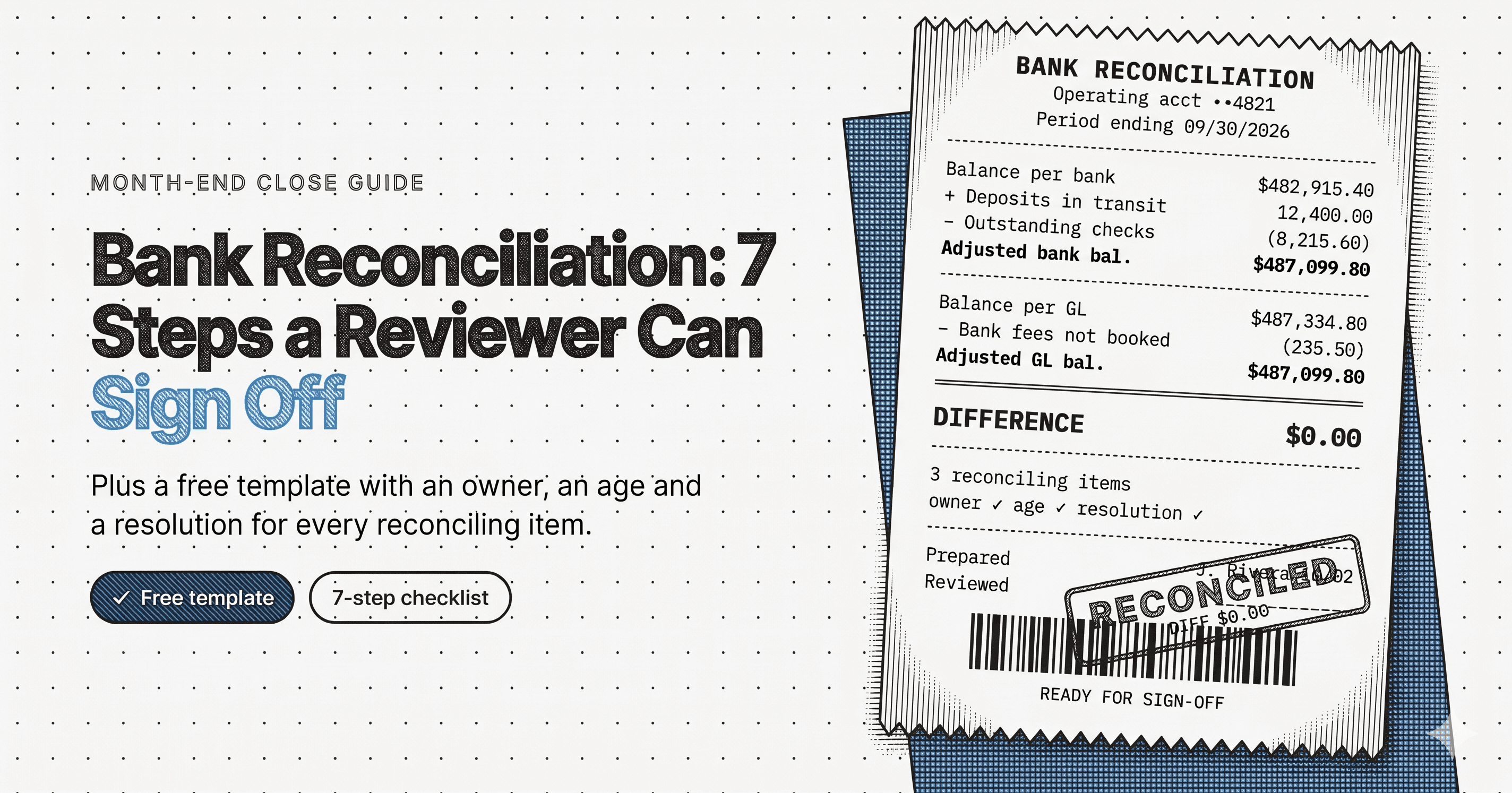
A bank reconciliation proves that the cash balance in your general ledger and the balance on your bank statement differ only for reasons you can name. Do it monthly for every account, and it catches missed fees, duplicate payments, and misapplied deposits while they are still cheap to fix.
This guide walks through the full process in seven steps, gives you a template to copy, and lists the checks a reviewer should run before signing. For the broader method across all balance sheet accounts, see Account Reconciliation: The Complete Guide.
What a bank reconciliation does
The ledger and the bank record the same cash on different schedules. You record a check the day you cut it. The bank records it when the payee deposits it. You record a customer payment when the remittance arrives. The bank records it when funds clear. The gap between those two clocks is the reconciliation.
The finished reconciliation shows one adjusted balance, reached from both sides. If the two sides do not land on the same number, an item is missing or wrong, and the reconciliation is not done. The bank reconciliation glossary entry covers the definition and the three families of differences.
Before you start: what to gather
Pull four things for each account:
- The bank statement for the period, or a bank feed export that ends on the statement date
- The general ledger cash detail for the same account and dates
- Last month's signed reconciliation, so you can see which items were open
- Support for anything unusual: wire confirmations, remittance advices, bank notices
Check that the opening balances agree with last month's closing balances. A break here means someone changed a prior period, and you need to find out who before matching anything.
The 7-step bank reconciliation process
Step 1: Record the two ending balances
Write the statement ending balance and the ledger ending balance at the same date, side by side. Everything that follows explains the difference between these two numbers.
Step 2: Match the ledger to the statement
Work through the statement line by line and tick each transaction that also appears in the ledger. Match on amount first, then date, then reference. Mark both sides so you can see what is left.
Watch for three traps. Two transactions with the same amount on the same day can match the wrong pair. One deposit in the ledger may cover several customer payments. A single bank debit may bundle several ledger entries. Tick these as groups and write down the arithmetic.
Step 3: List what did not match
Two lists result. Items in the ledger with no bank match are timing items: deposits in transit and outstanding checks. Items on the statement with no ledger match are bank-only items: fees, interest, returned deposits, automatic debits. Each is a reconciling item, and each needs an owner.
Step 4: Classify each reconciling item
Classification decides the treatment.
| Item | Where it sits | Needs a journal entry? |
|---|---|---|
| Deposit in transit | Ledger, not yet at bank | No, track until it clears |
| Outstanding check | Ledger, not yet at bank | No, track until it clears |
| Bank fee or service charge | Bank, not in ledger | Yes, record the expense |
| Interest earned | Bank, not in ledger | Yes, record the income |
| Returned deposit (NSF) | Bank, not in ledger | Yes, reinstate the receivable |
| Bank error | Bank side | No, contact the bank |
| Ledger error | Ledger side | Yes, correct the entry |
Fix errors where they were made. A bank error goes to the bank. Adjusting it away in your ledger hides a real problem and leaves the bank's records wrong.
Step 5: Compute both adjusted balances
On the bank side: start with the statement balance, add deposits in transit, subtract outstanding checks, and correct for bank errors. On the ledger side: start with the ledger balance, add or subtract the bank-only items, and correct for ledger errors.
The two results must agree to the cent. Do not accept a tolerance. A small difference is a transposition, a missed fee, or an item entered twice, and it is cheaper to find at $12.40 than at year end.
Step 6: Post the adjusting entries
Book a journal entry for every bank-only item and every ledger error. Date them at the reconciliation date, attach the support, and reference the reconciliation. Do not park an unexplained amount in a suspense account to make the totals agree. A suspense balance on the cash reconciliation is a plug with a different name.
Step 7: Review, sign, and file
The preparer signs and dates. A second person reviews, signs, and dates. File the reconciliation, the statement, and the support together, because the audit trail is the packet, not the spreadsheet alone.
Bank reconciliation template
Copy this into a spreadsheet, one tab per account per month.
Header
| Field | Entry |
|---|---|
| Entity | |
| Bank and account (last 4) | |
| GL account | |
| Statement date | |
| Prepared by, date | |
| Reviewed by, date |
Bank side
| Line | Amount |
|---|---|
| Ending balance per bank statement | |
| Add: deposits in transit (list each) | |
| Less: outstanding checks (list each) | |
| Add or less: bank errors (list each) | |
| Adjusted bank balance |
Ledger side
| Line | Amount |
|---|---|
| Ending balance per general ledger | |
| Less: bank fees and service charges | |
| Add: interest credited | |
| Less: returned deposits | |
| Add or less: ledger errors (list each) | |
| Adjusted ledger balance |
Check
| Line | Amount |
|---|---|
| Difference between adjusted balances (must be zero) |
Open items schedule
| Item | Date | Amount | Owner | Expected resolution |
|---|---|---|---|---|
The open items schedule is the part most teams skip, and it is the part a reviewer reads first.
What a reviewer should check
A reconciliation that balances can still be wrong. Reviewers should look for these:
- Aged items. A deposit "in transit" for four months is a problem, not a timing difference. Stale outstanding checks need to be voided or reported as unclaimed property under the rules of your state.
- Plug lines. Any line labeled "other," "miscellaneous," or "unreconciled" that absorbs the difference means the account does not reconcile.
- Offsetting clusters. Many small items that cancel each other point to an integration between two systems is dropping or duplicating transactions.
- Timing. A reconciliation finished three weeks after month end is a record of problems that already reached the financial statements.
- Segregation of duties. The preparer should not handle cash receipts, disbursements, or the bank relationship.
- Coverage. Every account needs one, including the dormant ones, which is where misappropriation hides.
Common bank reconciliation mistakes
Reconciling to the wrong date. Use the statement end date, not the date you sat down to work.
Matching on amount alone. Equal amounts on different transactions produce false matches, and the real item stays open.
Carrying items forward without an owner. An open item with no name beside it never clears.
Forcing the balance. Adjusting an account to make the check line read zero defeats the control the reconciliation exists to provide.
Skipping low-volume accounts. A payroll or petty cash account with ten transactions a month still needs the same two signatures.
Where bank reconciliation fits in the close
Cash is the first reconciliation most teams finish, because other work depends on it: accruals, cash application, and the flux review all read the cash balance. A late bank reconciliation pushes the whole month-end close back. Teams that reconcile weekly during the month, and keep the open items schedule current, close the account in an hour instead of a day.
How Adopt handles bank reconciliation
Adopt's agents pull the statement or bank feed, match each line to the ledger, classify every unmatched item, and draft the adjusting entries. For banks with no API, agents log in to the bank portal and pull the statement the way a person would. When an agent cannot support a match, it says so and routes the item to a person with the evidence attached.
Nothing posts without sign-off. A named reviewer approves each reconciliation, and every match links back to the transaction behind it. Adopt works on top of the accounting system you run today and never posts to a control account on its own.
Sign up free and run your next bank reconciliation on your own data, or book a demo and bring your messiest account.
FAQs

Related Articles
Bank Reconciliation: A Step-by-Step Guide (With Template)
How to Close the Books Faster: A Step-by-Step Guide for Controllers

See it running on your workflows
Automate your accounting workflows