
Why AI Accounting Workflows Fail (And What Works 2026)

Himanshu Gupta
Marketing17 July 2026

Key Takeaways
-
Most accounting firms mistake isolated Optical character recognition tasks for automation, yet true efficiency only triggers when you bridge the gap between extraction and general ledger posting. Structured execution requires managing state and dependencies across systems, not just speeding up a single document scan.
-
Standard pipelines are stateless and break during external API failures, whereas agentic systems maintain memory to resume work from the point of failure. These agents decompose high-level goals, like a monthly close, into a sequence of self-correcting steps rather than following a rigid, brittle script.
-
RPA serves as the muscle for legacy portals, while AI agents provide the brain, allowing firms to navigate fragmented client data without manual CSV exports. A production-ready stack treats the ERP as a dynamic system of record, ensuring every automated entry is validated against purchase orders in real-time.
-
Accounting demands absolute auditability, which is why successful deployments pair language models with strict logic gates and human-in-the-loop triggers. High-confidence tasks process instantly, while low-confidence anomalies surface with full reasoning trails, ensuring the system remains a "glass box" for auditors.
-
Shifting from data entry to exception handling allows a lean team to double client volume without increasing headcount or burnout. By removing the coordination overhead of manual handoffs, firms pivot from reactive bookkeeping to high-margin advisory services backed by real-time financial data.
-
A system survives production only if it includes checkpointing and recovery logic to handle the messy reality of inconsistent financial inputs. Long-term success depends on a unified data governance strategy that prevents "pilot fatigue" by ensuring every tool shares the same operational context.
In accounting workflows, the gap between AI interest and AI execution shows up quickly once work moves beyond isolated tasks. Adoption numbers look convincing on the surface; a 2024 survey by Intuit reports that 98 percent of accountants and bookkeepers have used AI for at least one task, yet 73 percent of firm leaders admit they have not deployed it in a structured way across workflows. The gap sits between experimentation and execution, and it shows up the moment work moves beyond a single document.
The difference becomes obvious when you compare a task with a workflow. Pasting an invoice into a model and extracting fields takes seconds. Running that same invoice through ingestion, validation against purchase orders, reconciliation with bank statements, and posting to a general ledger without manual handoffs is a different problem entirely. Each step introduces state, dependencies, and failure conditions.
If Accounting Fits AI So Well, Why Do Most Deployments Stall?
Accounting looks repetitive from the outside. Underneath, it is structured, rule-bound, and heavily audited, which makes it one of the cleaner candidates for AI-assisted execution. That does not mean deployments succeed by default.
What Makes Accounting Work Predictable Enough for AI to Handle?
Four properties define most accounting workflows: document-heavy inputs, repeated processes, rule-driven decisions, and audit requirements. Each property maps cleanly to a class of AI or automation technique. Document-heavy inputs, such as invoices, receipts, and bank statements, provide consistent entry points for Intelligent Document Processing (IDP). These documents vary in format but share predictable structures, which allows models to extract fields with high accuracy once trained on enough samples.
Repetition reduces variance. Monthly close processes, payroll runs, and reconciliation cycles follow the same sequence of steps with minor variations. Systems that rely on historical patterns perform better when the underlying process does not change frequently.
Rule-driven decisions constrain the search space. Tax classifications, expense categories, and compliance checks are not open-ended reasoning problems. They follow explicit rules that can be encoded, validated, and audited. Audit requirements force traceability. Every action must be logged, every transformation explainable. That constraint aligns with systems that maintain execution state and decision logs, which is a requirement for any production-grade AI system in finance.
Why Do Most Firms End Up With Disconnected Tools Instead of Automation?
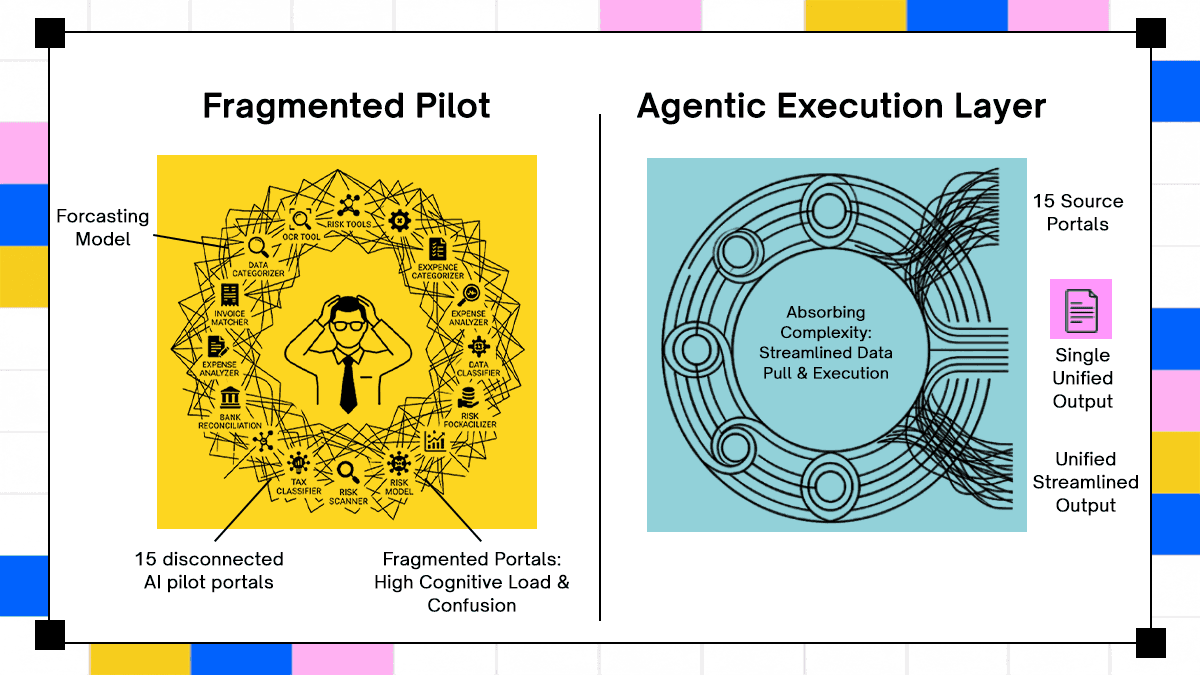
Most firms start with isolated tools. An OCR tool for invoices, a categorization model for expenses, a forecasting tool for cash flow. Each tool solves a narrow problem, but none owns the full workflow.
The cost shows up in context switching. A CPA logs into multiple systems, exports data, re-enters it elsewhere, and manually resolves mismatches. describes a case where accountants accessed multiple different client portals, ran scripts, and re-entered outputs into bookkeeping tools. That sequence is not automation, it is fragmentation.
Data fragmentation follows quickly. Each tool maintains its own state, often with inconsistent schemas. Reconciling data across tools becomes a manual task, which removes most of the expected efficiency gains. The result is predictable. Time spent per task decreases slightly, while total workflow time remains unchanged or increases due to coordination overhead.
Why Doesn’t Automating Just One Step Actually Save Time?
Automating a step reduces effort locally. Automating a process removes entire classes of manual intervention. The distinction matters because most ROI claims depend on the latter. A step-level automation might extract invoice data. A process-level automation ingests the invoice, validates it against purchase orders, checks for duplicates, posts entries to the ledger, and flags anomalies for review.
Adopt AI reports a reduction from 20 hours to one to two hours per client when workflows are automated end-to-end, not when individual steps are optimized. The time savings come from eliminating handoffs, not speeding up a single operation.
Process automation requires coordination across systems. It needs state tracking, error recovery, and decision logging. Without those, the system breaks the moment an external dependency fails.
What Changes When AI Agents Own the Entire Accounting Workflow?
Each accounting function behaves like a pipeline with defined inputs, transformations, and outputs. The difference in production comes from how these pipelines interact with real systems, not how they look on a diagram.
Instead of treating each function as a static pipeline, AI accounting agents operate as execution layers that coordinate these pipelines end to end. The difference shows up in how work is triggered and completed. A traditional system extracts data and passes it forward. An agent receives a goal, such as “process all invoices for Client A for March,” and determines how to execute it across ingestion, validation, reconciliation, and posting.
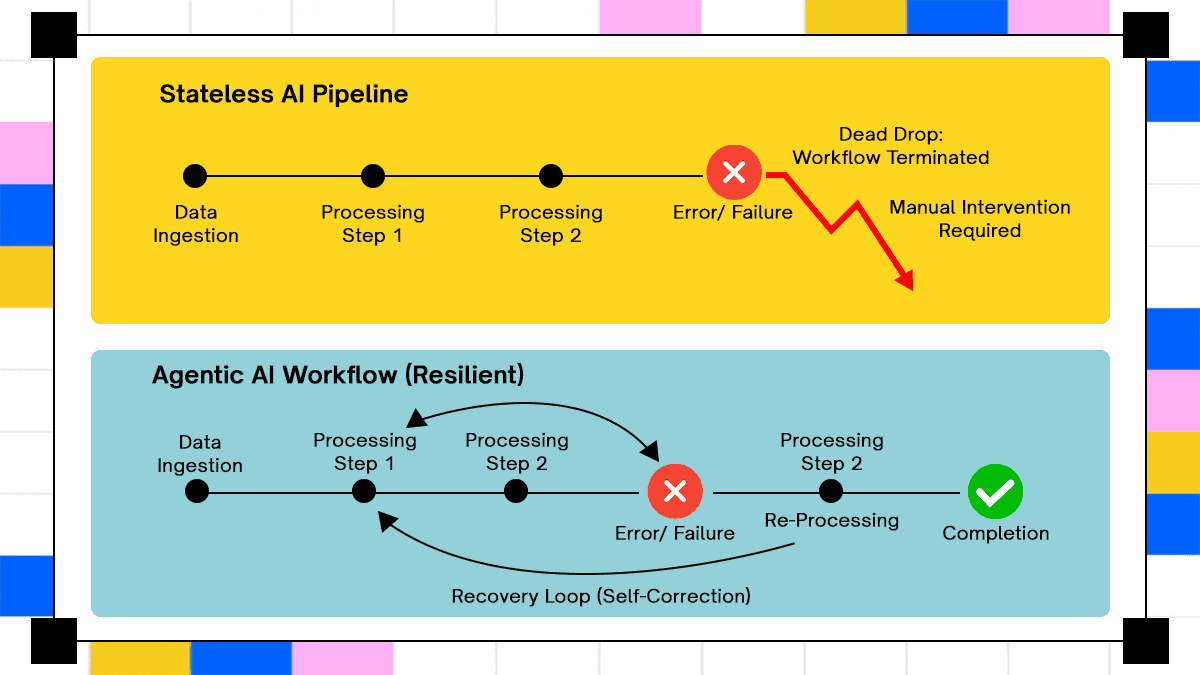
In practice, this means the agent maintains state across systems. It knows which invoices have been processed, which failed validation, and which are waiting for approval. When an external dependency fails, such as an ERP API timeout, the agent does not restart the workflow. It resumes from the last successful checkpoint. This behavior removes the need for manual reprocessing, which is a common failure point in accounting operations.
A concrete example is invoice-to-ledger automation. The agent pulls invoices from email or vendor portals, runs extraction through an IDP layer, validates entries against purchase orders, checks for duplicates in the general ledger, and drafts journal entries. Low-confidence cases are routed to a reviewer with full context, including source documents and reasoning trails. High-confidence entries move forward automatically.
This shift from step execution to goal-driven orchestration is what allows accounting systems to move from assisted workflows to production-grade automation. The agent does not replace existing tools. It coordinates them, ensuring that each step contributes to a consistent, auditable outcome rather than acting as an isolated improvement.
How Do You Automate Journal Entries Without Creating Duplicates?
Inputs include invoices, receipts, and bank statements. The system extracts structured data, maps it to a chart of accounts, and generates journal entries. Validation checks run against existing records, followed by duplicate detection and anomaly flagging.
A real workflow starts earlier than most diagrams show. A mid-sized firm managing 40 clients pulls invoices from email inboxes, shared drives, and vendor portals. An IDP layer extracts line items, then a mapping service assigns accounts based on historical patterns.
The system queries the general ledger in QuickBooks or Xero to check whether similar entries already exist. If a duplicate is suspected, it holds the entry and attaches both records for review. If no match exists, it drafts a journal entry and pushes it to a review queue.
Anomaly detection runs in parallel. A sudden spike in “office supplies” for a client that usually spends under a fixed threshold triggers a flag. The reviewer sees the extracted invoice, the mapped category, and the historical baseline before approving or correcting the entry. The output is not just a posted entry. It includes a linked audit trail showing the source document, extraction confidence, mapping logic, and reviewer action.
Can AI Actually Track and Explain SaaS Burn in Real Time?
Inputs include operational data, budgets, and historical financials. The system performs variance analysis and updates forecasts using time-series models. A practical example comes from SaaS companies tracking monthly burn and revenue. Data flows from billing systems like Stripe and CRM tools like Salesforce into the accounting system.
The AI layer compares actual revenue against forecasted numbers. If churn spikes in a specific segment, the system adjusts projections and flags the deviation. It does not stop at reporting the variance. It traces the source, such as a drop in renewals from a specific pricing tier.
Cost structure analysis runs alongside; If infrastructure costs from a provider increase by 30 percent in one month, the system correlates it with usage metrics. The output includes both the variance and a suggested explanation based on linked operational data. The workflow reduces the need for manual spreadsheet reconciliation. Analysts focus on interpreting deviations instead of calculating them.
How Do You Keep Up With Constant Tax Rule Changes Without Breaking Workflows?
Inputs include regulatory updates, financial records, and supporting documents. Classification models assign transactions to tax categories, while form population uses validated data. A real workflow appears during quarterly filings. The system ingests financial records from the general ledger and supporting documents from document storage systems. It classifies transactions based on jurisdiction rules, which vary across regions.
For firms operating in multiple countries, the system tracks updates from tax authorities and applies them to existing classifications. If a rule change affects prior entries, it flags them for re-evaluation instead of silently updating records. Form population happens after validation. Data flows into filing systems, and each field links back to its source. If a tax authority questions a value, the system retrieves the original document and the transformation steps used.
Tools like Thomson Reuters and Avalara integrate similar workflows, but most firms still handle cross-system coordination manually. The difference in production lies in traceability. Every number in a filing must map back to a document and a decision path.
Do You Still Need Sampling When AI Can Review Every Transaction?
Inputs include full transaction datasets, not samples. The system cross-references entries across ledgers, bank statements, and supporting documents. In a typical audit workflow, data is pulled from ERP systems and external sources. The AI system matches transactions across sources, checking for consistency in amounts, dates, and counterparties.
Instead of sampling 5 percent of transactions, the system analyzes the entire dataset. It flags inconsistencies such as unmatched entries, duplicate postings, or timing mismatches. A real example involves revenue recognition. The system compares contract terms from document repositories with recorded revenue in the ledger. If revenue is recognized before delivery milestones, it flags the entry.
Firms using platforms like EY or Deloitte deploy similar techniques internally, though often with custom-built systems. The output is a prioritized list of exceptions. Auditors spend time investigating flagged items instead of searching for them.
What Does a Production-Ready AI Accounting Stack Actually Look Like?
Accounting workflows look linear on paper. In production, they behave like distributed systems with partial failures, inconsistent inputs, and external dependencies that fail without warning. Each layer in the stack exists to handle one part of that reality.
Intelligent Document Processing (IDP)
Document ingestion sits at the front of almost every accounting workflow. IDP systems combine Optical Character Recognition (OCR), layout analysis, and language models to convert unstructured documents into structured data.
Modern IDP does more than field extraction. It preserves relationships between fields, such as linking line items to totals or mapping tax amounts to jurisdictions. Confidence scores are assigned at the field level, not just the document level, which allows selective human review instead of blanket validation.
A typical pipeline includes OCR for text extraction, layout models to understand document structure, and language models to normalize outputs. Systems like ABBYY and UiPath expose confidence thresholds and human-in-the-loop workflows because extraction errors propagate downstream if left unchecked. The failure mode appears when extraction is treated as the end of the workflow. Extracted data without validation or context becomes another source of inconsistency.
AI Agents
Agents operate above pipelines. Instead of executing predefined steps, they receive a goal and decide how to reach it using available tools. In accounting, a goal might be “reconcile bank statements for March.” The agent decomposes the task, selects tools for extraction, validation, and posting, and maintains memory across steps. It tracks which transactions have been processed and which require review.
The key difference lies in state management. Pipelines process inputs and produce outputs. Agents maintain execution state across multiple steps and systems, which allows recovery when something fails mid-process.
Frameworks like LangChain and OpenAI expose primitives for tool use, memory, and multi-step reasoning. Production systems add constraints, such as audit logging and deterministic execution paths, because accounting workflows cannot rely on probabilistic outcomes alone.
RPA And Where It Still Fits
Robotic Process Automation (RPA) handles deterministic tasks. Logging into portals, downloading reports, and entering data into legacy systems remain areas where RPA performs reliably.
RPA breaks when inputs change. A slight variation in UI structure or data format causes failures. That limitation becomes visible in accounting, where document formats and system interfaces vary across clients.
Pairing RPA with an AI reasoning layer changes its role. The AI system decides when and how to invoke RPA for specific actions, while RPA executes the action itself. This separation allows deterministic execution where possible and adaptive handling where required. Platforms like Automation Anywhere and Blue Prism are often used as execution layers rather than decision layers in these setups.
ML Pattern Recognition
Historical transaction data provides a basis for anomaly detection and fraud identification. Models trained on past records learn expected patterns and flag deviations. Supervised models detect known fraud patterns. They require labeled datasets, which limits their effectiveness when new fraud types emerge. Unsupervised models identify anomalies without predefined labels, which makes them useful for detecting unknown issues.
False positives remain a challenge. High sensitivity increases detection rates but also generates noise. Production systems balance this by combining statistical thresholds with rule-based filters. Banks and large accounting firms often use custom models trained on proprietary datasets. Smaller firms rely on embedded capabilities in accounting platforms or third-party tools.
Predictive Analytics
Forecasting moves beyond historical reporting. Cash flow predictions, late payment likelihood, and budget variance analysis rely on time-series models and regression techniques. Accuracy depends on data volume and consistency. Firms with limited historical data struggle to produce reliable forecasts. Seasonal businesses introduce additional complexity, as patterns shift throughout the year.
Systems embedded in platforms like SAP, Oracle, and Microsoft integrate forecasting directly into financial workflows. External tools require data synchronization, which introduces latency and consistency issues.
ERP Integration
ERP systems act as the system of record. Integration determines whether AI operates as an extension of existing workflows or as a separate layer. API-level integration allows data exchange without modifying core systems. It is easier to deploy but often lacks deep context, such as relationships between entities or custom business logic.
Native integration embeds AI capabilities within the ERP itself. It provides better context and consistency but requires tighter coupling with vendor ecosystems. SAP S/4HANA, Oracle NetSuite, and Microsoft Dynamics 365 illustrate this trade-off. Native features reduce integration overhead but limit flexibility. External systems offer flexibility but require careful synchronization.
What Actually Changes When You Move From Pipelines to Agents?
Moving from pipelines to agents changes how workflows are defined, executed, and recovered. The difference shows up in how systems handle goals instead of steps.
Why Isn’t Document Extraction Enough for Real Automation?
Traditional systems process documents. Agents execute workflows. The distinction matters because accounting work rarely ends at extraction. An agent receives an outcome, such as “complete monthly close for Client A.” It decomposes the goal into tasks, selects tools, executes them, and verifies results. Each step depends on the previous one, and failures require recovery logic.
In the blueprint described in , workflows include ingestion, validation, reconciliation, and posting, all handled within a single execution context. No step is treated as independent. Execution shifts from stateless operations to stateful processes. The system tracks progress, decisions, and dependencies across the entire workflow.
How Do Agents Coordinate Across Systems Without Breaking State?
Consider a batch of bank statements. The agent starts with ingestion, using IDP to extract transactions. It then queries the general ledger to find matching entries. Unmatched transactions trigger reconciliation logic. The agent drafts journal entries for review and logs every action for audit purposes. Each decision includes context, such as source documents and matching criteria.
If a downstream system fails, the agent records the failure and pauses execution. Once the system becomes available, it resumes from the last successful step instead of restarting the entire workflow. This orchestration requires coordination across multiple systems. It also requires strict logging, because every action must be traceable.
Where Do Humans Still Need to Step In, and Why?
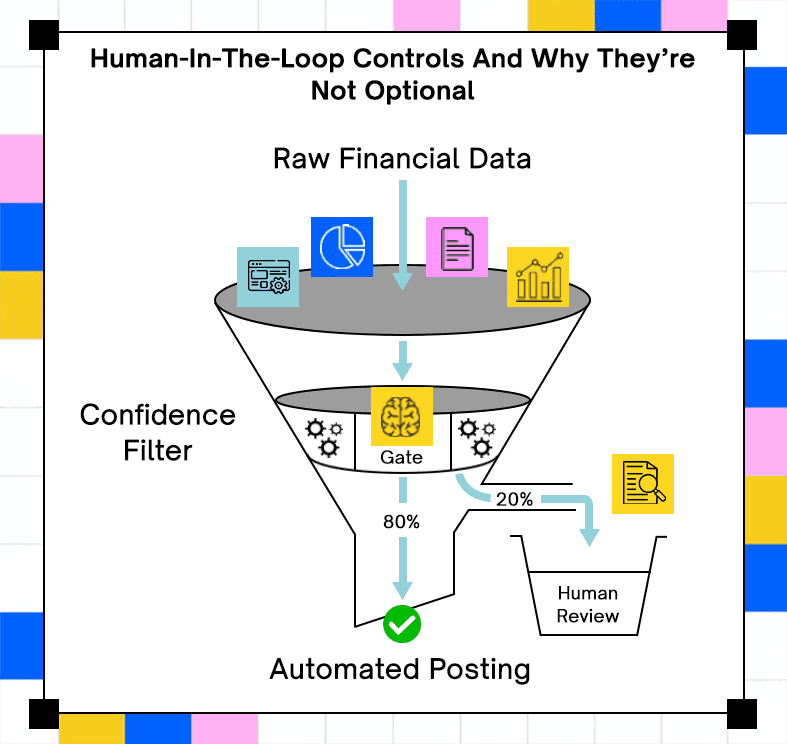
Confidence scores determine when human review is required. High-confidence operations proceed automatically. Low-confidence cases are escalated. The review interface matters. Accountants need context, not just outputs. They need to see source documents, extracted fields, and reasoning behind decisions.
Adopt AI surfaces reasoning alongside escalations, which allows reviewers to validate decisions quickly. Without context, human review becomes another bottleneck. Regulatory requirements reinforce this approach. Material entries require approval, and audit trails must include both automated decisions and human interventions.
What Happens When a Workflow Fails Midway?
Failures are inevitable. External systems go down, APIs return inconsistent data, and network issues interrupt workflows. A system that logs failures without recovery logic forces manual intervention. A system that tracks execution state can resume from the point of failure.
Checkpointing becomes essential. Each completed step is recorded, along with its outputs. When a failure occurs, the system identifies the last valid state and continues from there. This behavior prevents duplication. Without it, retries can result in duplicate entries or inconsistent records, which creates additional reconciliation work.
What Results Can You Expect Using Agents?
Performance claims need context. Time savings depend on workflow scope, data quality, and integration depth.
Time Reduction
Adopt AI reports reducing CPA workflow time from 20 hours to one to two hours per client. The reduction applies to end-to-end workflows, not individual tasks. An 80 percent reduction in processing time appears in scenarios where ingestion, validation, and posting are automated within a single system. Partial automation produces smaller gains.
The difference lies in removing handoffs. Each manual step introduces delays, errors, and coordination overhead.
Capacity And Headcount
Handling more clients without proportional hiring changes the economics of accounting firms. A firm managing 30 clients can double its workload without doubling staff if workflows are automated. Next Dimension Accounting in Australia reported a 200 percent revenue increase over two years using AI tools, without adding staff. The increase came from handling more clients and shifting focus to higher-value services.
Staff roles shift from data entry to review and analysis. That shift requires training but reduces repetitive work.
Error Detection
Automated systems detect patterns across entire datasets. Manual reviews rely on sampling, which misses edge cases. Duplicate entries, reconciliation mismatches, and misclassified expenses are common issues detected by AI systems. These issues often pass manual review under time constraints. False positives remain a factor. Systems need tuning to balance detection rates with review workload.
Revenue Impact For Firms
Redirecting accountant time toward advisory services increases revenue per client. Firms report up to 50 percent monthly revenue increases when focusing on advisory work instead of manual processing.
Client retention improves when firms provide timely insights instead of delayed reports. Around 35 percent of firms attribute stronger retention to AI-assisted workflows. Revenue gains depend on execution quality. Poorly integrated systems increase workload instead of reducing it.
What Does It Take to Move From Pilot to Production Without Breaking?
Most failures do not come from model accuracy. They come from systems that cannot survive real workflows with inconsistent inputs and failing dependencies. Production readiness depends on how the system behaves under stress, not during a clean demo.
Where Do Most AI Accounting Systems Break in Production?
Fragmented pilots rarely converge into a working system. Teams deploy OCR for invoices, a classifier for expenses, and a forecasting tool, then discover that none of them share context or state. describes this pattern clearly, multiple tools, each correct in isolation, failing as a workflow.
Change management gets underestimated. Accountants are not learning a new interface, they are changing how work flows through the firm. That shift affects review cycles, approvals, and audit processes.
Data governance issues surface late. Systems ingest inconsistent data, apply transformations, and produce outputs that look correct but fail under audit. Without strict controls on inputs and access, errors compound quietly.
How Should You Roll This Out Without Creating Risk?
Starting with high-volume, low-judgment tasks reduces risk. Bank reconciliation, expense categorization, and invoice matching provide structured entry points with clear validation rules. Once confidence builds, workflows extend into tax compliance and audit support. Each phase introduces more judgment and more regulatory constraints, which require tighter controls.
The sequence matters. Deploying complex workflows first often leads to failure because the system lacks stable foundations. Incremental rollout allows teams to validate assumptions and refine processes.
How Do You Evaluate AI Accounting Tools Beyond Surface Demos?
Integration depth determines whether the system understands relationships between data points or treats them as isolated fields. A system that cannot link ceding statements, reserves, and journal entries will fail in insurance accounting scenarios.
Deployment flexibility matters for compliance. Some firms require Virtual Private Cloud (VPC) deployments or on-premise setups due to data sensitivity. Confidence scoring transparency affects trust. Accountants need to know why a decision was made and how confident the system is. Black-box outputs create audit risks.
Audit trail completeness is non-negotiable. Every action must be logged, including inputs, transformations, and outputs. Missing logs invalidate the system under audit. Security certifications, such as SOC 2 and GDPR compliance, provide baseline assurance. They do not guarantee correctness, but they reduce operational risk.
What Needs to Be Controlled Before You Scale This?
Data quality is no longer the primary blocker. Modern IDP systems normalize messy inputs with reasonable accuracy. Governance shifts the focus to access control, encryption, and decision logging. Systems must restrict who can view and modify data, especially in multi-client environments.
Bias detection becomes relevant in classification models. Misclassification of transactions can introduce systemic errors if not monitored. Governance also defines ownership. Someone must be responsible for validating outputs, reviewing anomalies, and maintaining system integrity.
How Do Roles Change Once Workflows Become Automated?
AI changes the distribution of work. It does not remove the need for accountants, it changes what they spend time on.
Entry-Level And Staff Accountants
Manual data entry declines. Document handling and basic categorization become automated. Work shifts toward exception handling. Accountants review flagged transactions, validate outputs, and communicate with clients when anomalies appear. Skills change accordingly. Structured thinking, attention to detail, and the ability to interpret system outputs become more valuable than repetitive data entry.
Senior Accountants
Oversight moves from managing processes to interpreting outputs. Senior accountants focus on trends, anomalies, and strategic implications. They also manage AI systems. That includes setting thresholds, defining rules, and reviewing edge cases where automated decisions are uncertain. Day-to-day work includes validating system behavior, not just reviewing financial statements.
CFOs
CFOs take ownership of AI strategy. They decide which workflows to automate, how to allocate budget, and how to measure returns. They also define governance standards. That includes approval workflows, audit requirements, and risk management policies. The decision is not whether to use AI, but how deeply it integrates into operations. A collection of isolated tools does not produce the same results as a coordinated execution layer.
The Accountant Shortage Context
Fewer graduates are entering accounting. Existing teams handle increasing workloads with limited capacity. AI acts as a capacity multiplier. Firms that adopt structured workflows handle more clients without proportional hiring. Delaying adoption increases pressure on existing teams. Work accumulates, and manual processes become harder to sustain.
What Does Fully AI-Driven Accounting Actually Look Like?
The current phase focuses on assistance. Systems extract data, flag anomalies, and support decision-making. The next phase shifts toward execution.
AI-native operations involve coordinated agents handling multi-step workflows across systems. These workflows run without per-task human initiation, but still include human approval where required.
Preconditions matter. Systems need reliable integration, consistent data models, and strict governance before moving to this stage. Without those, automation introduces risk instead of reducing it. Execution platforms become as important as models. The model decides what to do, the platform ensures it happens correctly, with logging, recovery, and auditability.
The shift is not about replacing accountants. It is about changing how accounting work gets executed, from manual coordination to system-driven workflows that maintain state, handle failures, and produce auditable outputs.
FAQs

Related Articles
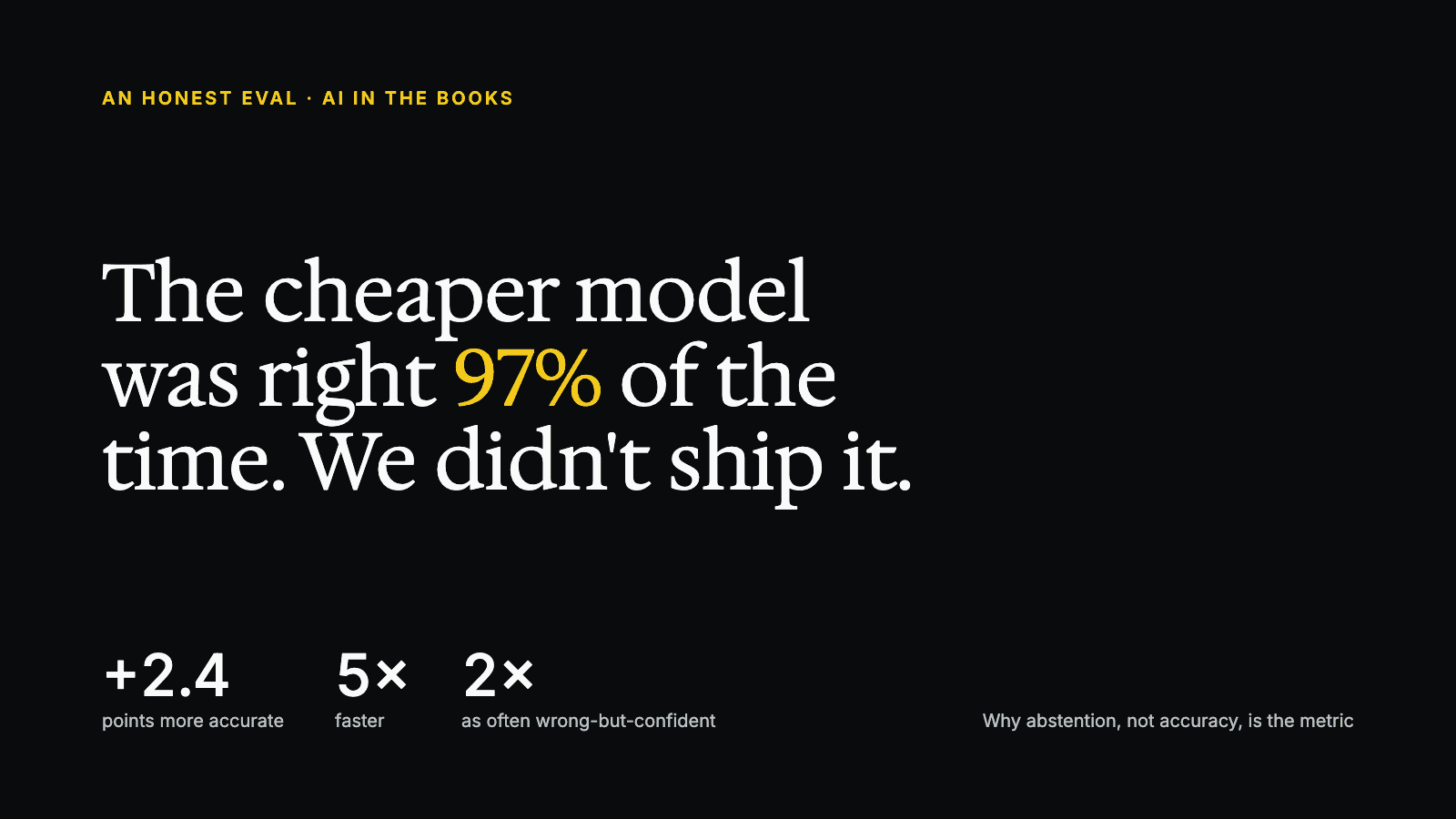
The Cheaper Model Was Right 97% of the Time. We Didn't Ship It.

AI in Accounting: 58 Statistics for 2026 (With Sources and Dates)

See it running on your workflows
Automate your accounting workflows