

We breakdown how brands are automating invoice processing using agentic AI. Read the deep dive into the challenges, solutions and more.


TL;DR
- Legacy OCR and RPA break on minor layout shifts like moved logos. Agentic AI prevents these crashes by reading documents semantically, understanding field context instead of relying on rigid visual templates.
- Rule engines freeze on non-PO expenses like utilities or SaaS subscriptions. Agents eliminate this backlog by analyzing line-item descriptions against historical patterns to assign correct General Ledger codes autonomously.
- On-premise ERP software often lacks the modern APIs required by standard tools. Agentic systems bypass this block by operating user interfaces exactly like human employees, navigating screens, managing portal logins, and entering data directly.
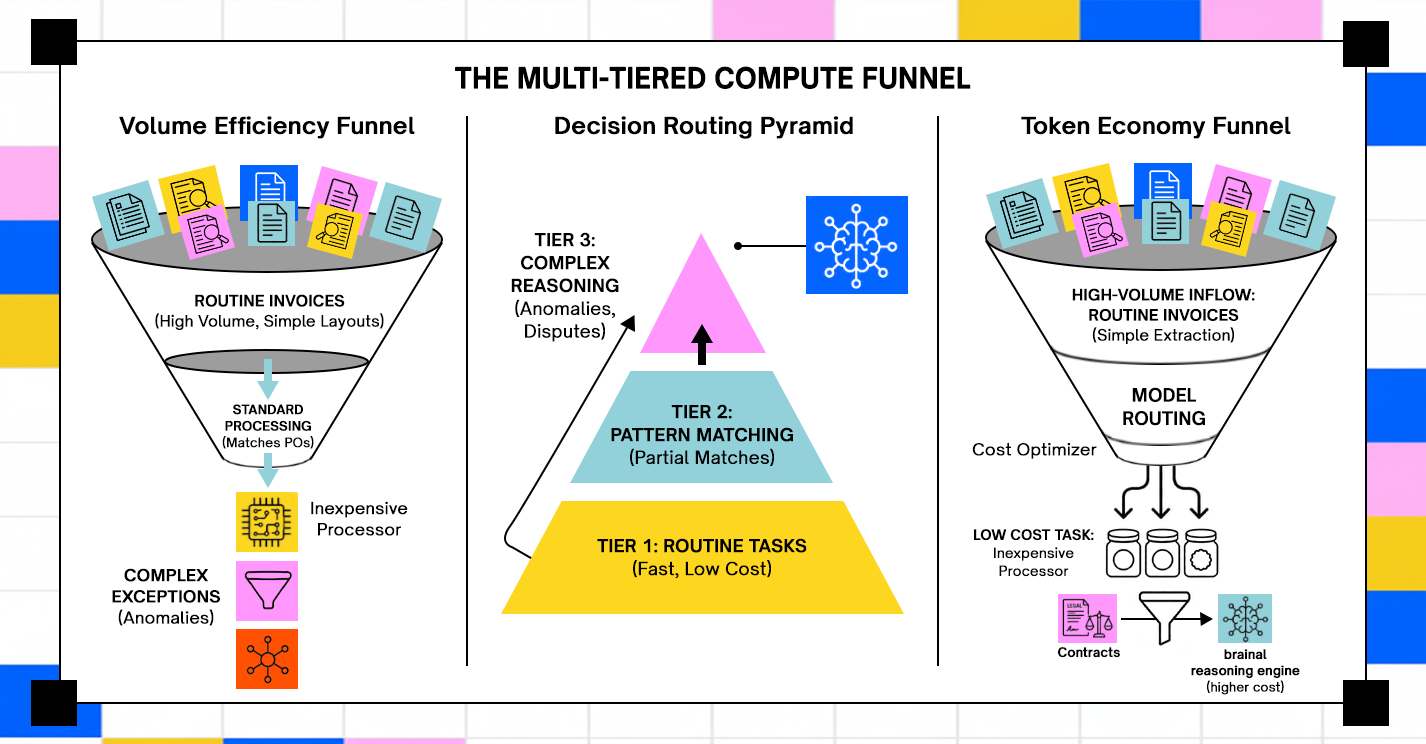
- Running every document through an advanced AI model forces processing costs to scale linearly. Smart architectures fix this with tiered routing: cheap models handle simple invoices, reserving expensive reasoning power for complex contract disputes.
- Transitioning from manual workflows drops processing costs from $22 to under $5 and shrinks timelines to under four days. For enterprises handling over 1,000 monthly invoices, this operational leap secures an immediate 300% to 500% first-year ROI.
Why Invoice Processing Automation Breaks Down Before It Starts Working
The promise of accounts payable (AP) automation has haunted corporate finance departments since the early 2010s. Yet, decades into the push for "digital transformation," the reality remains shockingly manual.
Academic data tracking operational baselines confirms that the vast majority of purchase invoices are still handled via manual workflows, incurring a baseline cost of $9.87 to $16.00 per invoice and stretching cycle times across 12 to 18 days (LUT, 2026). Compounding this operational friction, processing errors plague an estimated 12% to 15% of manually processed documents, forcing companies to endure massive, hidden downstream overhead costs to fix accounting discrepancies.
The market has noticed the stagnation. The Gartner 2025 Magic Quadrant for Accounts Payable Applications points out that while hyperautomation tools claim to boost touchless processing, most enterprises are still fundamentally struggling with data completeness and workflow exceptions.
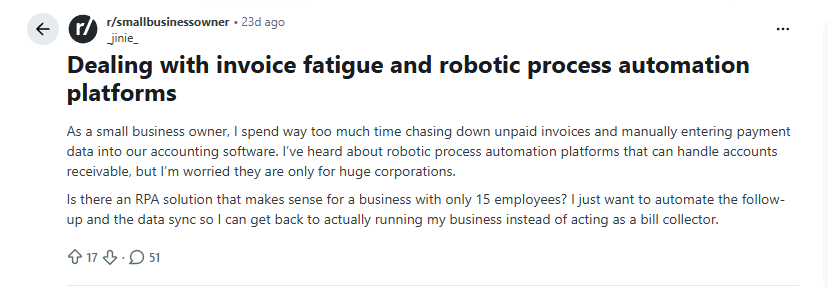
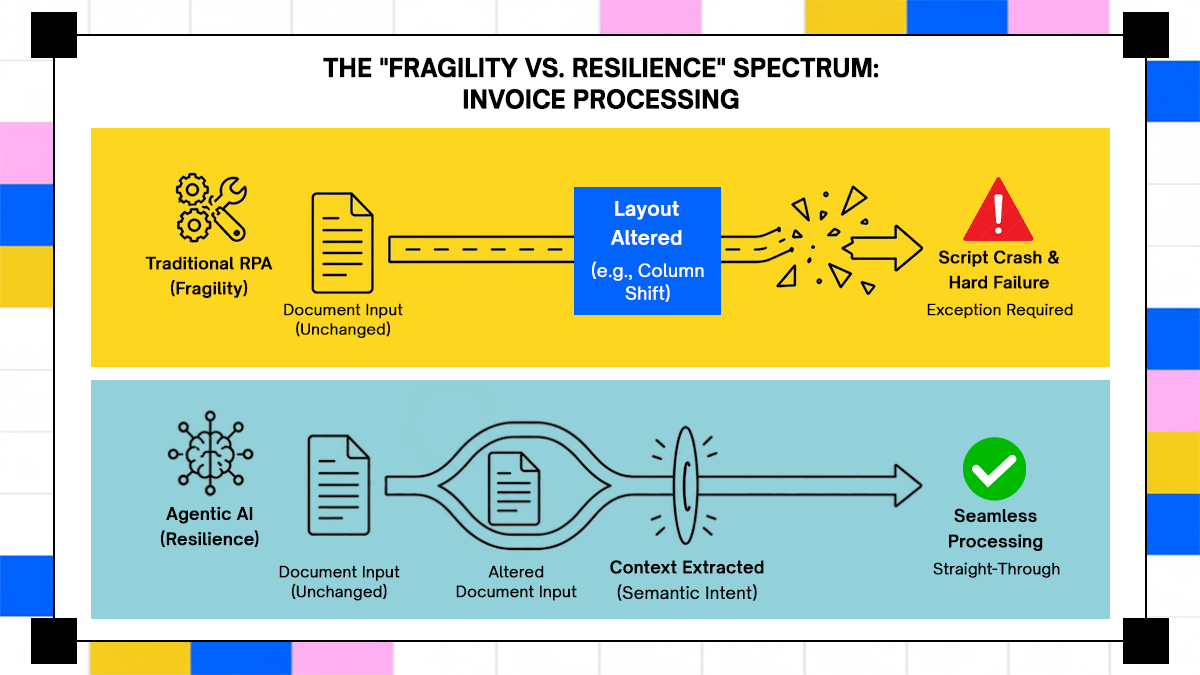
If you browse the r/RPA or r/accounting communities on Reddit, the real-world frustration becomes crystal clear. Threads are filled with engineering and AP teams venting about "Monday morning exception queues." The typical scenario plays out like clockwork: a supplier subtly shifts their brand logo three centimeters to the left, alters a column header from "Qty" to "Quantity", or sends a low-resolution scanned PDF. To a human, it’s obviously the same invoice. To a legacy Optical Character Recognition (OCR) template or a rigid Robotic Process Automation (RPA) bot built on static UI coordinates, it's a catastrophic system failure.
Traditional tools were engineered exclusively for predictable, structured formats. But a real corporate inbox is inherently chaotic. Multi-page documents arrive with nested line-item tables, or worse, as non-Purchase Order (non-PO) expenses like utility bills, SaaS subscriptions, and professional legal retainers. Because these documents lack a clean PO number to map against, legacy engines immediately throw their hands up.
Consequently, traditional automation projects only ever solve the "easy 60%" of predictable invoices. They quietly dump the remaining, complex 40% back onto human analysts. The team’s workload doesn't actually disappear; it simply transitions from manual data entry to exhaustive exception triage. Moving past this barrier requires shifting from rigid, template-matching bots to resilient, Agentic AI systems capable of semantic reasoning and autonomous decision-making.
The Structural Gap Between OCR Extraction and End-to-End Processing
Invoice automation vendors have spent years conflating two very different things: capturing invoice data and processing an invoice. OCR and template-based tools do the former. End-to-end processing is a different animal entirely. Extraction is step one of roughly eight. After the data is captured, an AP team still needs to validate it against the purchase order, run a goods-receipt check, handle any exceptions, route the invoice for the appropriate approval, assign GL codes, post to the ERP, and schedule payment. Each of those steps is a possible handoff back to a human. Systems that only extract leave six or seven handoffs on the table.
The below sections of this article walk through each step where agents can take over and where, in genuinely ambiguous cases, they should surface context to a human reviewer rather than guess.

Why Non-PO Invoices Are the Real Differentiator
Every AP automation vendor handles PO-matched invoices reasonably well. The hard problem, the one that separates capable systems from the ones that quietly generate exception queues, is non-PO invoices. Utility bills, SaaS subscriptions, consulting retainers, professional services engagements: none of these have a matching purchase order to validate against. GL coding them requires contextual knowledge about the vendor relationship, the spend category, and often a cost center allocation that varies by department and changes as teams reorganize.
The example below shows a lightweight implementation where an LLM receives an invoice line item and returns a structured GL assignment along with the reasoning used to make that decision.
import json
from openai import OpenAI
# Replace 'YOUR_API_KEY' with your actual OpenAI API key
client = OpenAI(api_key='YOUR_API_KEY') # <--- You MUST replace 'YOUR_API_KEY' with your actual key from https://platform.openai.com/account/api-keys
def assign_gl_code(vendor: str, line_description: str) -> dict:
"""Uses LLM reasoning to map historical coding patterns to unstructured expenses."""
prompt = f"""
Map this non-PO invoice line item to a GL Code and Cost Center based on historical context.
Vendor: {vendor}
Line Description: {line_description}
"""
response = client.chat.completions.create(
model="gpt-4o",
response_format={"type": "json_object"},
messages=[
{
"role": "system",
"content": (
"You are an AP invoice coding assistant. "
"Return valid JSON with keys: "
"gl_code, cost_center, reasoning."
)
},
{
"role": "user",
"content": prompt
}
]
)
return json.loads(response.choices[0].message.content)
# Example invoice classification
result = assign_gl_code(
vendor="AWS",
line_description="EC2 compute charges for production Kubernetes cluster"
)
print(json.dumps(result, indent=2))

In a production AP workflow, this JSON payload would move into the downstream approval and ERP posting pipeline. Organizations typically combine these recommendations with confidence thresholds, approval routing logic, and audit logging before allowing invoices to post automatically into financial systems such as SAP or NetSuite.
A rule-based system has no way to make that judgment call. It can apply a stored mapping for known vendors, but the moment a new vendor appears, or a known vendor's invoice includes an unfamiliar line item, the system throws an exception. In organizations processing thousands of invoices per month, those exceptions stack up fast, and they represent exactly the invoices that require the most time to resolve. An agentic system trained on document understanding and vendor context can reason about GL assignments the same way an experienced AP analyst would: reading the invoice, cross-referencing it with historical coding for similar vendors, and making a defensible assignment rather than a guess.
How Agentic AI Processes an Invoice Without the Team Touching It
The architecture of an agentic invoice processing system differs from traditional automation at every stage. Below is the actual sequence an agent executes, from the moment an invoice arrives to the point where it posts to the ERP.
Document Ingestion and Multi-Format Extraction
Invoices arrive through email attachments, vendor portal downloads, EDI feeds, and scanned paper via document cameras. An agentic system handles all of these without requiring separate pipelines for each channel. The extraction layer is where the gap between traditional OCR and AI-powered document understanding becomes concrete. Traditional OCR performs character recognition and achieves roughly 80–85% accuracy on degraded scans, which sounds acceptable until you're processing 5,000 invoices a month and 750 of them require manual review because the OCR couldn't read the text clearly.
AI-powered extraction adapts to new layouts without needing a developer to retrain the system on new templates. Gartner's Market Guide for Accounts Payable Invoice Automation Solutions notes that machine-learning parsing of machine-readable documents can push accuracy rates into the high 90% range. Modern systems report over 99% accuracy on complex documents, including multi-page invoices, nested tables, and invoices with handwritten notes in the margins.
Semantic extraction changes the problem from positional OCR to contextual document understanding. Instead of relying on fixed invoice templates, the model interprets the meaning of fields directly from the document content. This becomes especially important when suppliers send multi-page invoices, inconsistent table layouts, or low-quality scanned PDFs that would normally break traditional OCR pipelines.
from pydantic import BaseModel, Field, ConfigDict
from openai import OpenAI
# Make sure to replace 'YOUR_API_KEY' with your actual OpenAI API key
# or use the same key that worked in the previous cell
client = OpenAI(api_key='YOUR_API_KEY')
# Define a schema for a single line item
class LineItemSchema(BaseModel):
description: str = Field(description="Description of the line item")
amount: float = Field(description="Amount of the line item")
model_config = ConfigDict(extra='forbid') # Ensures 'additionalProperties': false in JSON schema
class InvoiceSchema(BaseModel):
vendor: str = Field(description="Normalized vendor name")
invoice_num: str = Field(description="Exact invoice string")
total: float = Field(description="Grand total amount")
line_items: list[LineItemSchema] = Field(description="Extracted invoice line items") # Use the new LineItemSchema
model_config = ConfigDict(extra='forbid') # Ensures 'additionalProperties': false for the top-level schema
def extract_semantic_invoice(raw_text: str) -> InvoiceSchema:
"""Reads unstructured invoice text and extracts structured financial data."""
completion = client.beta.chat.completions.parse(
model="gpt-4o-mini",
messages=[
{
"role": "system",
"content": (
"You are an accounts payable document parser. "
"Extract structured invoice fields accurately."
)
},
{
"role": "user",
"content": f"Extract invoice data from this document:\n\n{raw_text}"
}
],
response_format=InvoiceSchema
)
return completion.choices[0].message.parsed
# Example invoice text
sample_invoice = """
Vendor: Stripe Inc.
Invoice Number: STR-2026-4481
Line Items:
- SaaS Platform Subscription - $899
- API Usage Charges - $221
Total Amount: $1120
"""
# Run extraction
parsed_invoice = extract_semantic_invoice(sample_invoice)
# Print structured output
print(parsed_invoice.model_dump_json(indent=2))
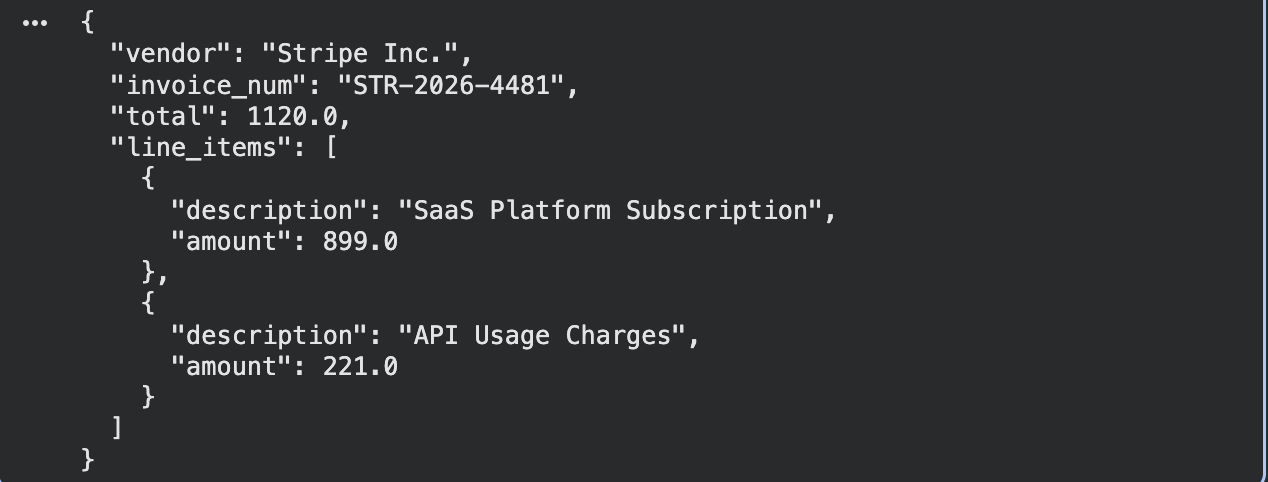
The extracted payload is already normalized into a strongly typed schema before it moves downstream into matching and approval workflows. That normalization layer matters because every vendor formats invoices differently. By converting documents into a consistent structure early in the pipeline, downstream systems no longer need custom parsing logic for each supplier, which significantly reduces exception handling overhead at scale.
What gets extracted: header data (vendor name, invoice number, date, payment terms, currency), line items (description, quantity, unit price, extended amounts), tax fields, shipping charges, and any referenced PO numbers. The agent structures this data in a normalized format before passing it to the matching layer, which means downstream steps don't need to account for the variability in how different vendors format the same information.
Adopt AI's platform reads invoices, PDFs, and reports, pulling out line items, totals, and key fields without any template setup, and cleans up duplicates and formatting inconsistencies before the data reaches downstream systems.
Three-Way Matching, Exception Detection, and the Approval Routing Decision
Once data is extracted, the agent runs matching logic against two additional documents: the purchase order and the goods receipt. Three-way matching is the standard for PO-backed invoices, and the matching logic needs to handle real-world messiness: quantity tolerances (a delivery of 98 units against a PO for 100), price variances (invoice unit price differs from PO unit price by 1.5%), currency differences, and partial deliveries where only some line items have been received.
When a mismatch falls inside a configured tolerance, the agent auto-approves and routes to payment. When it falls outside tolerance, the agent generates a structured exception report and routes it to a specific approver, not a generic "invoice exceptions" queue, based on vendor relationship, dollar amount, department ownership, or a combination of rules defined by the organization. The difference between routing to a named person with full context versus dumping into a shared queue is not cosmetic; it's what determines whether the exception gets resolved in two hours or sits for three days.
Adopt AI's human-in-the-loop mechanism surfaces the complete investigation report to the finance team via a dashboard or Slack notification before executing resolution actions. The team can review the agent's recommended action and approve or correct it. When a dispute arrives claiming an incorrect detention fee, for instance, the agent searches for the relevant freight agreement, reads the PDF, extracts the applicable rate tables and charge definitions, applies the contracted terms to the disputed invoice, and presents its conclusion with supporting documentation attached.
ERP Write-Back and Audit Trail Generation
After approval, the agent handles GL code assignment, cost center allocation, posting to the ERP (SAP, NetSuite, Oracle Fusion, Microsoft Dynamics), and payment scheduling. Each of these steps is deterministic given the decisions already made upstream, so the agent executes them without requiring further human input on clean invoices.
The audit trail generated at this stage is where agentic systems deliver compliance value that manual and semi-automated approaches cannot match. Every agent action is logged with timestamps, decision rationale, and the full history of any exceptions or re-routes. SOX compliance requires demonstrating that controls were applied consistently; GDPR requires demonstrating that personal data in vendor invoices was handled according to documented procedures; internal auditors need to trace any invoice back through every decision point. An agentic system generates all of this continuously, as a byproduct of normal operation, not retroactively when someone files an audit request and the team spends two days pulling records from multiple systems.
Where AI Agent Architecture Differs From RPA-Based Invoice Bots
Teams that have lived through an RPA implementation know the failure modes well: overnight bot crashes, Monday-morning exception queues, developer time spent rewriting scripts every time a supplier changes their PDF template. The architectural comparison below is aimed at exactly those readers.
Why RPA Bots Break on Invoice Variability and How Agents Handle It
RPA bots operate on fixed UI coordinates and predetermined field locations. When a vendor updates their invoice layout (moving a field, changing a column header, adjusting the table structure), the bot fails and raises an exception. In AP, vendor template changes are constant. Suppliers update their billing systems, change their branding, switch invoice generation tools. For an RPA deployment, each change is a maintenance event requiring a developer to update the script.
Agents trained on document understanding instead of UI coordinates read the semantic content of a document. A line item table is a line item table whether its columns are labeled "Qty / Unit Price / Total" or "Quantity / Rate / Amount." The agent interprets the document structure rather than pattern-matching against a memorized layout. In production, this translates to fewer overnight failures, smaller exception queues on Monday mornings, and no change management cost when a supplier updates their PDF. The RPA approach scales number of exceptions linearly with vendor count; the agentic approach doesn't.
Handling Legacy ERPs and Portals With No Public API
A surprisingly large portion of logistics, manufacturing, and government contractor ERP deployments run on systems with no REST API, no EDI capability, and no modern integration layer. Standard AP automation tools, which assume API connectivity, simply can't reach these systems. The integration project becomes the bottleneck, and in some cases the blocker.
Adopt AI's Application Use capability addresses this directly. Application Use allows agents to operate software the way a human employee would: navigating interfaces, clicking through screens, entering data, and reading outputs. Agents work across systems that, clicking through screens, entering data, and reading don't expose any programmatic access. A practical example: an agent logs into a freight carrier's invoice portal using Adopt AI's Tabby authentication layer (which routes login prompts to the finance team in real time via Slack or email, without storing credentials), downloads the invoice PDF, extracts the line items, cross-references them against the carrier's contract rate table, and posts the validated data to the company's ERP. No human touches the invoice, and the carrier doesn't need to expose an API or change anything about how their portal works.
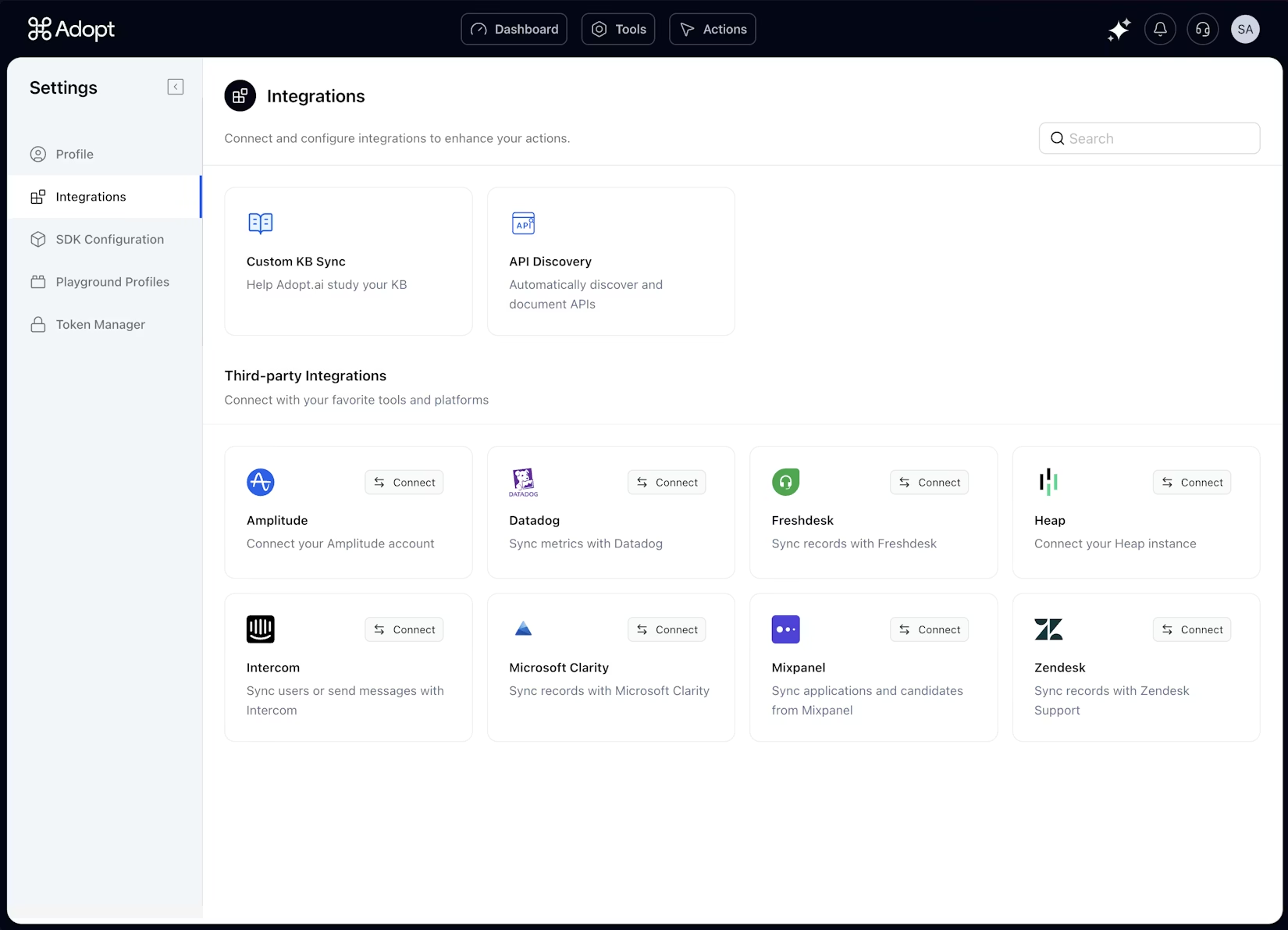
Adopt AI's Zero-Shot API Discovery (ZAPI) capability goes a step further: it onboards new carrier portals in 24 hours without documentation, by having the agent crawl the portal and capture the underlying network calls, building queryable endpoints where none formally existed.
Model Routing and Cost Control in Multi-Vendor AI Architectures
For platform engineers managing token costs at volume: not every invoice requires the same model capability. A routine PO-matched invoice from a known vendor with clean formatting can run through a lightweight model at low cost. A complex dispute that requires reading a freight contract PDF, interpreting tiered rate tables, and reasoning about which accessorial charge definition applies needs a more capable model. Applying the same compute cost to every invoice regardless of complexity is fine at low volume and expensive at high volume.
Adopt AI routes tasks to models based on complexity, reserving advanced reasoning for cases that require it and handling straightforward tasks with lighter models. At 10,000 invoices per month, that routing decision makes a meaningful difference in platform operating cost. The tradeoff is explicit: a flat model architecture simplifies infrastructure but scales cost linearly with invoice volume; tiered routing requires more configuration but keeps per-invoice cost from growing with throughput.
One of the hidden operational costs in large-scale invoice automation is model overuse. Running every invoice through the most advanced reasoning model increases inference cost linearly with document volume. Production systems avoid this by introducing routing layers that classify invoice complexity first, then dynamically assign compute resources based on financial risk, document ambiguity, and exception probability.
def route_invoice_by_complexity(invoice_meta: dict) -> str:
"""Routes invoices to specific AI models based on invoice complexity and risk."""
# High-value invoices or disputes require stronger reasoning models
if (
invoice_meta.get("total_amount", 0) > 25000
or invoice_meta.get("is_disputed")
):
return "gpt-4o"
# Clean PO-backed invoices can run on lightweight low-cost models
if (
invoice_meta.get("has_valid_po")
and not invoice_meta.get("variances")
):
return "gpt-4o-mini"
# Medium-complexity invoices fall back to the standard reasoning layer
return "gpt-4o"
# Example invoice scenarios
invoice_a = {
"total_amount": 4200,
"has_valid_po": True,
"variances": False,
"is_disputed": False
}
invoice_b = {
"total_amount": 87000,
"has_valid_po": False,
"variances": True,
"is_disputed": True
}
# Model routing decisions
print("Invoice A Model:", route_invoice_by_complexity(invoice_a))
print("Invoice B Model:", route_invoice_by_complexity(invoice_b))

This routing strategy keeps infrastructure costs predictable while still reserving advanced reasoning capacity for genuinely difficult cases such as disputed freight invoices, contract interpretation, or multi-party reconciliation. The architectural objective is not only higher automation accuracy, but sustaining that accuracy without allowing inference cost to grow uncontrollably as invoice throughput increases across vendors and business units.
Integration Architecture: Connecting Agents to the Systems AP Teams Already Use
Integration is the part of the implementation that most often gets underestimated at the start and overrun by the end. The concern from finance and IT teams isn't whether an AI system can extract invoice data. The question is whether the system can connect to the ERP without an 18-month IT project.
ERP Connectivity Patterns: API-First vs. UI Automation vs. Hybrid
Three integration modes cover the majority of enterprise AP environments. API-first connections work where the ERP exposes clean endpoints: NetSuite's SuiteTalk, SAP's REST APIs, Oracle Fusion's web services layer. UI automation covers systems with a web interface but no API, which includes older SAP on-premise versions, legacy freight portals, and government procurement portals. Hybrid approaches combine both: agents pull structured data via API where available and fall back to UI automation where no API exists.
Adopt AI's 500-plus MCP connectors handle the API-first category. Application Use covers UI automation. The practical implication is that the integration approach doesn't require the organization to replace or rebuild the existing ERP stack. A company running SAP on-premise with no REST API gets the same coverage as one running Oracle Fusion with full API access, through a different connectivity mechanism, but with the same agent logic handling the invoice workflow on top.
Vendor Portal Handling for Logistics and Supply Chain AP Teams
Freight invoice processing is a technically demanding variant of standard AP automation, and it deserves specific treatment. Invoices arrive from dozens of carriers, each with their own portal login, their own invoice format, and their own dispute workflow. Accessorial charges (detention fees, fuel surcharges, port handling fees) are calculated against carrier-specific contract rate tables that change on negotiation cycles. A single detention fee error on a high-volume lane can represent meaningful revenue leakage over a quarter if it's not caught.
Adopt AI's freight-specific capabilities include validating accessorial charges against carrier contracts, mapping container tracking events to invoice line items, and interpreting tiered pricing structures. When the agent detects a discrepancy between the carrier's invoice and the contracted rate, it drafts a dispute response detailing how the charge should have been calculated, identifies where the carrier's invoice deviates, and attaches the relevant contract excerpt and shipment timeline. What previously consumed more than 30 minutes per dispute per analyst runs autonomously, with human review triggered only for disputes above a dollar threshold or those involving contract ambiguity.
Deployment Options and Data Residency Considerations
Cloud versus on-premise isn't a preference for organizations in regulated industries: it is a compliance requirement. Adopt AI offers both cloud-hosted and on-premise deployment. On-premise deployments keep invoice data, extracted fields, vendor contract contents, and audit logs entirely within the organization's environment, which matters for financial institutions, healthcare organizations, and any company with explicit data residency requirements baked into its InfoSec policy. Cloud deployments typically offer faster model updates and lower infrastructure overhead but require data processing agreements and vendor security review cycles that can add months to procurement timelines.
Role-Based Access Control (RBAC) is available on the platform, allowing administrators to define user roles and restrict access to specific features and data based on job responsibilities. Comprehensive activity logging supports both internal audit requirements and external regulatory review.
Measuring Invoice Processing Automation: Metrics That Matter for AP Teams
Picking the right metrics early determines whether an implementation team can demonstrate progress or spends six months arguing about whether the numbers are moving. The three metrics below are distinct, and conflating them produces misleading conclusions about system performance.
Touchless Rate, Exception Rate, and Straight-Through Processing Percentage
Touchless rate is the percentage of invoices processed without any human interaction. Exception rate is the percentage that require human review for any reason, a broader measure that includes both genuine errors and system uncertainty. Straight-through processing (STP) rate is the strictest metric: the percentage of invoices that move from receipt to ERP posting without a single manual step. An invoice can be "touchless" for extraction but still require approval routing that technically involves a human click; STP counts only the ones that complete all steps with zero intervention.
Enterprise AP teams using mature automation typically report 90–95% STP rates after three to six months.. Early in implementation, the number can sit at 60–70% and improves as the system accumulates vendor pattern data and the organization tunes its matching tolerances. Expecting 90% STP in month two is the wrong calibration; expecting a clear improvement curve from month one is the right one.
Cost Per Invoice and Cycle Time as Baseline Metrics for ROI Calculation
Manual processing runs $10 to $22 per invoice and takes an average of 14.6 days from receipt to payment, per APQC and Ardent Partners benchmarking. Automated systems bring cost down to $2–5 and cycle time to under four days. IOFM benchmarks cited across multiple industry reports put the manual cost near $6.30 per invoice for organizations with better-than-average manual processes, with automated cost near $1.45, a 77% reduction.
The ROI calculation framework: multiply current monthly invoice volume by current cost per invoice, subtract projected automated cost per invoice, then subtract platform subscription and implementation cost. Processing automation becomes cost-effective at roughly 100–200 invoices per month. For organizations processing 1,000-plus invoices monthly at a conservative $15 manual cost, that's $15,000 per month in processing cost alone, before late payment penalties, early payment discount losses, and error correction overhead. First-year ROI for those volumes typically falls between 300% and 500%, with payback in three to six months.
Exception Quality as a Leading Indicator of System Maturity
Exception count alone doesn't tell you whether an implementation is progressing. An immature system generates high volumes of false-positive exceptions, flagging invoices that a human reviewer approves instantly without further investigation. The AP team's workload doesn't decrease; it just shifts from data entry to exception triage, which isn't much of an improvement.
Exception quality measures something more useful: whether the exceptions the system surfaces are the right ones, routed to the right people, with enough context to resolve quickly. A mature system surfaces only the genuinely ambiguous cases (vendor disputes, invoices with missing PO references that cannot be resolved automatically, GL coding decisions that fall outside historical patterns), and attaches the full investigation context (contract excerpt, invoice line items, shipment history, relevant policy rule) to each one. If your AP team is spending more than fifteen minutes resolving the average exception after six months of operation, the system's exception quality hasn't matured. The benchmark to aim for is exceptions that resolve in under five minutes because the agent already did the investigative work.
Conclusion
The article covered the specific failure modes of OCR and RPA-based tools, the eight-step processing cycle that agentic systems can execute end-to-end, the architectural differences that make agents resilient to invoice variability, the integration patterns that connect agents to both modern and legacy ERP environments, freight-specific complexities, and the metrics that distinguish a progressing implementation from a stagnating one.
The technology for end-to-end invoice processing automation is mature enough for production deployment. The choice for finance and platform teams is between point solutions that cover individual steps (extraction, approval routing, payment scheduling) and agentic platforms that execute the complete workflow, including exceptions, portal logins, contract interpretation, and ERP write-back. Organizations processing high invoice volumes with vendor diversity, legacy systems, or freight-specific complexity get the most measurable return from the agentic approach. The implementation risk isn't the AI. The real gap is integration coverage and whether the AP team's exception workflows get re-examined honestly rather than mapped one-to-one onto the new system.
FAQs
1. What Is the Difference Between Invoice Processing Automation and Accounts Payable Automation?
Invoice processing automation isolates the handling of individual documents, focusing strictly on ingestion, extraction, matching, and ERP posting. Accounts payable (AP) automation is the overarching ecosystem that encompasses invoice processing but extends to vendor onboarding, payment execution, statement reconciliation, and cash flow forecasting.
2. How Does AI Invoice Processing Handle Invoices That Don't Match a Purchase Order?
When an invoice lacks a matching purchase order (e.g., utility bills or consulting retainers), AI systems read the unstructured line-item text and cross-reference it with historical vendor data. By matching descriptions to past organizational spend patterns, the agent autonomously assigns the correct General Ledger (GL) codes and cost centers without human data entry.
3. Can Invoice Automation Software Connect to Legacy ERPs That Have No API?
Yes, modern agentic systems bypass the lack of REST APIs through advanced user interface (UI) automation. By interacting with software exactly like a human employee, the AI agent logs into legacy green-screen terminals or custom freight portals, navigates menus, reads on-screen data, and types information directly into the system.
4. How Long Does It Take to Implement an AI-Based Invoice Processing System?
Initial deployment, including secure data routing, core software integrations, and initial ingest testing, typically concludes within two to four weeks. However, reaching an optimal 70% to 90% straight-through processing rate generally takes three to six months as the models ingest historical vendor patterns and teams refine matching tolerances.

.svg)
.svg)


Take three minutes to find out which side of that line you are on.
Browse Similar Articles


Find Your Agentic AI Readiness Score
Every enterprise thinks they are building toward Agentic AI. But only few actually are.
Take three minutes to find out which side of that line you are on.