

Discover how embedded iPaaS differs from traditional iPaaS in architecture, implementation, and cost.


TL;DR
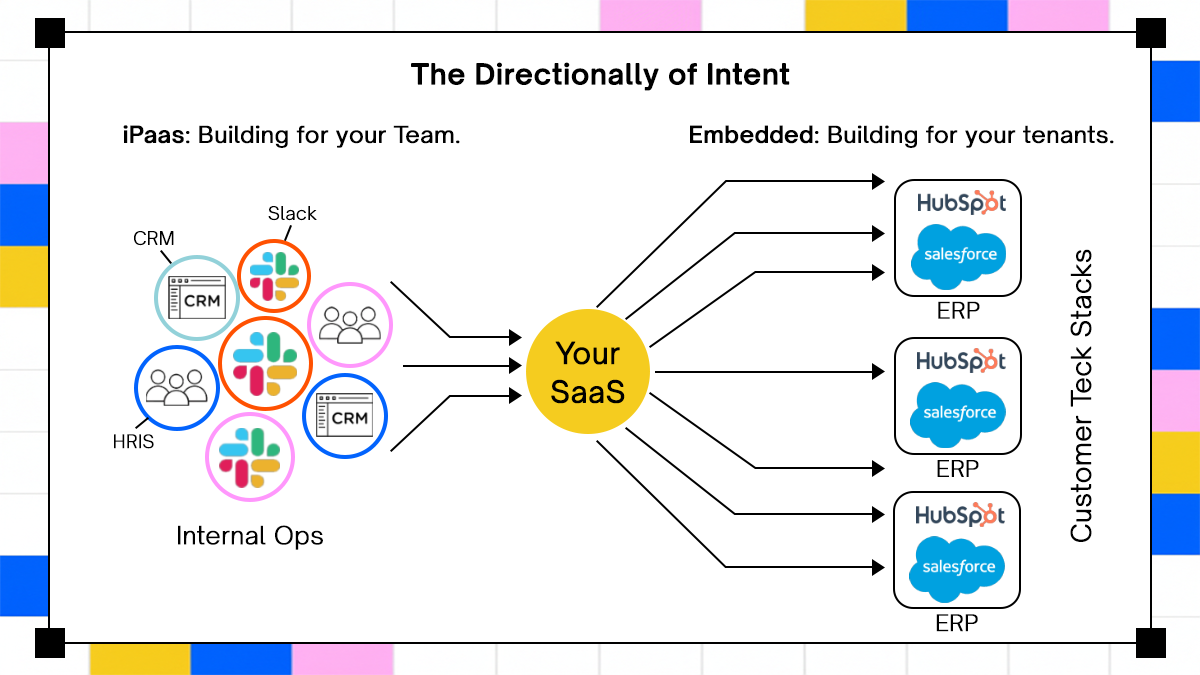
- Traditional iPaaS tools (Zapier, Workato, Boomi, MuleSoft) are built for internal operations automation. Connect systems your own team uses, not systems your customers use.
- Embedded iPaaS installs inside your SaaS product via SDK or REST API, giving your engineering team a white-labeled integration surface they control end-to-end, per tenant.
- The two models are routinely confused because iPaaS vendors now wrap their core products and market them as "embedded" solutions. The architecture underneath hasn't changed.
- At enterprise scale, both models hit specific failure modes: serialization latency, webhook queue saturation, bulk sync constraints, and multi-tenant auth complexity.
- Adopt AI introduces a third approach grounded in zero-shot API discovery and agentic execution, where systems don't need to be pre-modeled before agents can act on them.
- The right decision depends on your integration pattern, deployment environment, and customer expectations, not on connector count or vendor branding.
Why Integration Decisions Go Wrong Before the First Line of Code
Every B2B SaaS team eventually hits the same wall. Customers start asking for integrations, engineers start building them one at a time, and somewhere around the fifth request, the maintenance burden tips past the cost of building them. At that point, someone in a planning meeting says, "We should use an iPaaS," and the team reaches for the nearest tool, usually whatever the ops team already uses to move data between internal systems.
That's where the confusion locks in, and it tends to be expensive to unwind. According to Gartner's 2025 Magic Quadrant for iPaaS, the iPaaS market exceeded $9 billion in revenue in 2024, growing 23.4% year-over-year, and is forecast to exceed $17 billion by 2028. With that kind of growth comes a proliferation of vendors, overlapping terminology, and marketing that obscures real architectural differences. The ONEiO 2026 Integration Trends Report puts the total number of integration software solutions on the market at over 900, of which roughly 270 are specialized iPaaS platforms. Choosing the wrong category for your use case doesn't just waste a procurement budget. It means rebuilding the integration layer once enterprise customers arrive with requirements the original tool couldn't meet.
This article covers how traditional iPaaS and embedded iPaaS differ at the system level, where each model breaks down, how Adopt AI's agentic approach changes the calculus for teams building AI-native products, and how to make the decision based on your actual integration patterns rather than vendor positioning.
Why SaaS Teams Keep Confusing Two Very Different Integration Problems
The surface-level similarity between traditional iPaaS and embedded iPaaS is real. Both involve connecting applications. Both involve some form of workflow logic, credential handling, and data movement. Both have vendors who use overlapping vocabulary. Getting past the surface requires understanding which problem each model was built to solve.
The Integration Debt Accumulation Pattern In Growing SaaS Products
Early-stage SaaS teams build integrations the way most engineers build anything new: one at a time, in-house, with direct API calls. The first integration takes three weeks. The second takes two. By the fifth, the team has a growing list of webhooks to maintain, OAuth flows to keep alive, and third-party API versions to track whenever an upstream vendor ships a breaking change.
The tipping point usually arrives somewhere between three and five integrations, when the maintenance overhead starts competing directly with new feature work. At that stage, the team looks for a platform. The error is reaching for whatever iPaaS the ops or RevOps team already uses. Tools like Zapier, Workato, and Boomi are designed for internal automation: connecting your CRM to your marketing platform, routing lead data between sales tools, and syncing finance records between internal systems. When a SaaS team tries to use those tools to deliver integrations for their customers, the experience breaks in specific and predictable ways.
The customer has to create their own iPaaS account, configure the integration themselves, and maintain it. The SaaS vendor has no visibility into what's happening. Support becomes a screensharing exercise. And the integration, however functional, doesn't feel like a native part of the product.
How Vendor Marketing Muddies The Category Boundaries
The confusion is compounded by a real trend in the market: traditional iPaaS vendors building "embedded" products layered on top of their core infrastructure. Tray Embedded and Workato Embedded are the clearest examples. Both started as internal automation platforms and later wrapped their products to offer an embedded tier.
The problem is structural, not cosmetic; the DNA of a platform built for ops teams (non-technical users, no-code workflow builders, task-based pricing, shared execution queues) is still present in the wrapped version. Auth flows redirect to the iPaaS vendor's domain rather than staying inside your product. White-labeling is incomplete. Developer support is limited because the core product was never built for product engineers. And self-hosted deployment is practically impossible because the entire infrastructure is cloud-native with no mechanism to run inside a customer's VPC.
When those limitations surface after six months of build time, the cost isn't just the license fee. It's the rework, the delayed enterprise deals, and the re-evaluation of a category decision the team thought was already settled.
Where Adopt AI Fits Into This Picture
Adopt AI operates outside the traditional iPaaS and embedded iPaaS binary entirely. The platform is built around Zero-Shot API Ingestion (ZAPI), a proprietary discovery mechanism that automatically identifies and catalogs an application's APIs without requiring Postman collections, Swagger documentation, or manual endpoint definitions. Rather than pre-modeling systems before agents can act, Adopt discovers the integration surface at runtime and generates structured, executable actions from it.
Per Adopt's official product documentation, ZAPI captures real API calls through simulated or manual user flows, structures them in an LLM-readable format, and makes them immediately available as callable tools. When an API changes, the system re-evaluates the surface on the next execution cycle rather than breaking against a stale model.
Adopt also deploys in cloud, VPC, or fully on-prem environments via Helm. It is SOC 2 Type 2 certified, ISO/IEC 27001 compliant, with GDPR, CCPA, and HIPAA readiness built in. The platform's architecture uses a control plane / data plane split: the control plane (orchestration, configuration, tooling) runs on Adopt's managed infrastructure, while the data plane (execution, API calls, storage) stays entirely within the customer's environment.
Traditional iPaaS and embedded iPaaS have legitimate use cases. The right call depends on your deployment context, your customers' expectations, and how dynamic your integration surface is.
What Traditional iPaaS Actually Does At The System Level
Understanding where traditional iPaaS is useful, and where it isn't, requires looking at the mechanics, not the marketing materials.
The Internal Automation Execution Model: Recipes, Triggers, and Data Flow
Traditional iPaaS platforms operate on a trigger-action model. A trigger (a new record in Salesforce, a form submission, a webhook from a payment processor) fires a workflow recipe. Each step in the recipe reads input data, transforms it, and passes it to the next step. Every step involves a serialization and deserialization cycle: data is encoded, sent over the network, received, decoded, transformed, and re-encoded before moving forward.
For low-frequency internal workflows, this overhead is imperceptible. For high-volume workloads, it compounds. Each deserialization boundary adds latency. A workflow processing tens of thousands of records sequentially can take hours where a direct API call would take minutes.
Concurrency is the other constraint; most traditional iPaaS platforms enforce strict limits on parallel execution within a shared queue. A large enterprise running a bulk data import and a smaller customer waiting on a real-time trigger can end up competing for execution slots. The small customer's trigger may sit queued for an hour while the large customer's batch job clears. That behavior is acceptable in internal automation contexts where someone's Slack message to Salesforce sync can wait. It's not acceptable in customer-facing product integrations.
Pricing compounds the problem. Traditional iPaaS tools typically charge per task execution. Bi-directional syncs, which require two tasks per update per object, can generate costs that scale into thousands of dollars per month for even moderately active enterprise customers.
How B2B SaaS Teams Try To Repurpose iPaaS As A Customer Integration Layer
The strategy is straightforward: build a connector for your application on Zapier, Workato, or a similar platform. Publish it. Tell customers they can use the iPaaS to set up whatever integrations they need. Avoid the engineering cost of building and maintaining integrations in-house.
The mechanics work until something breaks or a customer needs help. At that point, the SaaS vendor has no access to the customer's workflow execution logs, no visibility into how the customer configured their data mapping, and no ability to diagnose the issue without either asking the customer to add them to their iPaaS account or walking through a screenshare to reconstruct what happened. Support tickets multiply. Solutions engineers spend time building and debugging other companies' Zapier workflows rather than building products.
There's also a monetization gap that's easy to miss upfront. Integrations that live inside a third-party platform can't be packaged as a premium feature, sold as an upsell, or priced as part of your product. The customer pays the iPaaS vendor. The SaaS company gets nothing except the integration checkbox on the sales call.
When Traditional iPaaS Is Actually The Right Tool
None of the above means traditional iPaaS is a bad product category. It means it's designed for a specific job, and that job is internal automation: connecting your CRM to your data warehouse, routing form submissions to your ticketing system, syncing marketing attribution data between platforms your team uses.
The person who should own and operate traditional iPaaS tools is your operations, RevOps, or IT team, not product engineering. When a marketing operations manager needs Marketo to sync with Salesforce, Workato is a reasonable tool. When a product team needs to deliver a Salesforce integration to 500 customers as a native feature of their SaaS product, Workato is in the wrong category entirely.
How Embedded iPaaS Works Architecturally and Where It Breaks
Embedded iPaaS is a fundamentally different model. The platform installs inside the SaaS product, not alongside it.
The Embedded Model: SDK Installation, Tenant Isolation, and White-Labeling
An embedded iPaaS integrates into a SaaS product via SDK or REST API. The engineering team uses the platform's tooling to build integration logic, pre-built connector abstractions, and workflow definitions. The resulting integration surfaces inside the product's own UI, white-labeled, with the host product's branding.
Multi-tenancy is handled at the platform level. Each customer gets isolated credential storage, their own OAuth 2.0 token management and refresh cycle, separate execution logs, and tenant-scoped configuration. The SaaS vendor owns the integration experience end-to-end. Customers authenticate their third-party accounts and enable the integration. They don't need to understand what's running underneath.
Pre-built connectors handle a significant portion of the integration surface: OAuth flows, token refresh, rate limit retry, standard endpoint abstractions. They save engineering time on most integration use cases. The coverage gap shows up at the edges, specifically at non-standard endpoints, custom objects, and enterprise-specific API extensions that the connector library doesn't include. Those gaps require custom code, which reintroduces the in-house maintenance problem the platform was supposed to eliminate.
Execution Constraints That Surface At Enterprise Scale
The architectural assumptions baked into most embedded iPaaS platforms hold up well for simple, event-driven integrations. They start showing stress when enterprise customers arrive with more demanding requirements.

Serialization overhead in low-code workflow builders is a real constraint. Every step in a visual workflow passes through a deserialization layer. For a workflow processing thousands of records, each step adds latency at each boundary. A workflow that looks fast in testing against a sample dataset can take hours against a production enterprise customer's full data volume.
Webhook processing is a separate problem. Most embedded iPaaS platforms are designed for the trigger-action pattern ("when X happens, do Y"). A single enterprise customer onboarding can spike the webhook queue by 10x, a volume the infrastructure wasn't sized for at steady state. Platforms that route all webhook events through the same execution pool as regular workflow triggers have no mechanism for queue isolation, so a spike from one tenant degrades performance for others.
Bulk data sync is where the architecture's limits become most visible. Forcing 500,000 historical CRM records through a workflow step-by-step is not a use case the infrastructure was designed to handle. Platforms without incremental sync primitives (pagination, change detection, deduplication) either time out, produce duplicate records, or require expensive custom workarounds to complete the import at all.
The White-Labeling Gap In "Wrapped" Embedded Solutions
When a traditional iPaaS is wrapped and resold as an embedded product, the white-labeling gaps show up in the customer experience. Auth flows redirect to the iPaaS vendor's domain. Integration configuration pages appear in iFrames that display the vendor's branding rather than the host product's. Customers notice, and they ask questions about who has access to their credentials.
The security implications are more serious than the UX friction. When customer credentials flow through a third-party cloud infrastructure that the SaaS vendor doesn't control, the data security review becomes more complicated. The SaaS vendor's InfoSec team can't validate the security posture of an infrastructure they don't manage. Enterprise customers with strict data residency requirements can't get the answers they need. Deals stall in security review.
Self-hosted deployment is structurally unavailable for cloud-native iPaaS infrastructure. The entire execution model depends on shared cloud services. Offering a customer a VPC deployment would require re-architecting the core product, which vendors with a traditional iPaaS at their foundation have little incentive to do.
The Architectural Decision Matrix: Choosing Based on Integration Pattern, Not Vendor Claims
The question isn't which vendor has the most connectors or the cleanest UI. The question is whether the platform's execution model matches your integration pattern.
Mapping Your Integration Patterns To Platform Capabilities
Four integration patterns cover the majority of product integration requirements, and each maps differently to the available infrastructure options.
Pattern 1: Simple trigger-action automations.
A new contact in your product creates a record in the customer's CRM. A deal closed in the CRM triggers a workflow in your product. Either model handles this pattern without significant constraints.
Pattern 2: Bi-directional data sync.
Records need to stay consistent between two systems in real time, with conflict resolution when both sides update the same field. Traditional iPaaS task-based pricing makes this prohibitively expensive at scale. Standard embedded iPaaS requires careful architecture to avoid duplicate execution. Code-first embedded infrastructure handles it natively.
Pattern 3: LLM tool calls for AI agents.
Agents need to read system state, decide what action to take, and write back across multiple systems in a single reasoning cycle. Static connector libraries don't expose the breadth of actions agents need, and pre-modeled workflows don't accommodate the dynamic decision paths agents follow. Discovery-based platforms like Adopt handle this natively.
Pattern 4: High-volume webhook processing.
Hundreds or thousands of events per second from external APIs need to be ingested, deduplicated, and routed in real time. Most embedded iPaaS platforms enforce steady-state webhook rate limits that won't survive a large enterprise customer onboarding. Infrastructure with auto-scaling and tenant-level queue isolation handles this reliably.
Multi-Tenancy Depth and What "Per-Customer Configuration" Actually Requires
Connector count is the wrong evaluation metric for embedded integration platforms. The right question is how deeply the platform supports per-customer configuration when each customer has a different CRM schema, custom objects, non-standard field names, and enterprise-specific API extensions.
Platforms that enforce a fixed data model work well when customers look similar. The first enterprise customer with a heavily customized Salesforce org, a custom object called "Opportunity_v2", and seventeen non-standard field mappings will expose the ceiling immediately.
Custom field mapping, dynamic schema resolution at the field level, and per-customer workflow variants are the capabilities that determine whether the integration holds up in an enterprise account, not whether the connector covers the standard endpoints. Those capabilities should be tested against your hardest use case during evaluation, not your simplest one.
Adopt's ZAPI approach changes this calculation by removing the pre-modeling requirement. Rather than requiring engineering teams to define each customer's system structure in advance, the platform discovers it at runtime, captures it, and generates structured actions from whatever the API surface actually looks like. When the schema changes, the platform re-discovers rather than breaking.
Deployment Model and Security Surface Area
Three deployment scenarios represent the actual range of requirements engineers face in enterprise SaaS contexts.
The first is a fully managed cloud, where execution runs on the vendor's shared infrastructure. Traditional iPaaS is limited to this scenario. Most embedded iPaaS platforms built on cloud-native infrastructure are also limited here, though some offer single-tenant cloud as an add-on.
The second is single-tenant cloud, a dedicated cloud environment where one customer's data runs in isolated infrastructure. Some embedded iPaaS vendors offer this at enterprise pricing tiers.
The third is VPC or on-prem deployment, where execution happens entirely within the customer's environment and sensitive data never transits the vendor's network. Traditional iPaaS can't offer this structurally. Adopt explicitly supports this model via Helm-based VPC deployment, with a control plane / data plane split that keeps execution within the customer's environment while the configuration and tooling surface runs on Adopt's managed infrastructure.
The downstream effect on sales cycles is significant. Enterprise customers in healthcare, financial services, and government will require data residency guarantees before signing. Security reviews that would clear in two weeks for a VPC-deployable platform can take months for a shared-cloud-only tool. SOC 2 Type 2 scope, GDPR Article 28 processor obligations, and HIPAA Business Associate Agreement coverage all change depending on where data flows.
Production Operations: Observability, Failure Modes, and Maintenance Overhead
What gets demonstrated in a sales proof-of-concept almost never reflects what breaks six months into production. The behaviors that matter are what happens when a third-party API goes down, when a schema changes without warning, and when a large customer's bulk import competes with everyone else's real-time triggers.
Log Access and Execution Visibility Across Multi-Tenant Integration Runs
Good execution observability means per-tenant logs with payload capture, retry history, and error classification that distinguishes between upstream downtime, schema mismatch, and auth failure. When something breaks for a customer, the engineering team needs to identify the cause without asking the customer to describe what they were doing.
In the traditional iPaaS partner model, the SaaS vendor has no access to execution logs at all. The customer owns the workflow. The customer owns the logs. Diagnosing an integration failure requires either being added as a collaborator to the customer's iPaaS account or reconstructing events from customer descriptions. Neither is a sustainable support model at scale.
Adopt's production controls include human-in-the-loop approvals, audit trails with scope, intent, and outcome logged for every agent action, and verified execution recovery. Per Adopt's official product page, the platform provides built-in traces for every agent step and action, with real-time dashboards for performance, adoption, usage trends, and system metrics. These are production-grade requirements, not optional add-ons.
API Version Drift and Upstream Change Management
Third-party APIs change. Salesforce deprecates endpoints. HubSpot reorganizes its data model. When a critical endpoint breaks, someone needs to catch it and ship a fix before customers notice. In embedded iPaaS, the vendor is responsible for maintaining pre-built connectors. In a build-in-house model, your team absorbs the work. In either case, there's a lag between when an upstream API changes and when the connector update ships.
Adopt's zero-shot discovery model handles upstream changes differently. When an API structure changes, the platform re-evaluates the surface on the next execution cycle rather than continuing to execute against a stale model that no longer matches reality. Per Adopt's GCP connector documentation, the platform automatically maintains and updates integrations so agents always work with the latest API versions without requiring manual maintenance.
The static connector library failure mode is worth naming directly: connectors that cover 90% of standard endpoints are very good, until the customer needs the 10% they don't cover. Enterprise customers, almost by definition, live in that 10%.
Concurrency, Queue Fairness, and What Happens During Enterprise Onboarding
The tenant starvation problem is underappreciated in iPaaS evaluation conversations because it doesn't surface in proof-of-concept environments. It shows up in production, during an enterprise customer onboarding, when a bulk data import consumes execution capacity and degrades real-time trigger performance for every other tenant in the shared pool.
Platforms that handle all executions through a shared queue have no structural mechanism for tenant isolation. When one customer's workload spikes, other customers' workflows wait. Auto-scaling at the platform level helps but doesn't eliminate the fairness problem. Platforms with dedicated execution queues per tenant can run large and small customers concurrently without interference.
Integration Strategy For B2B SaaS: How The Two Models Work Together
Neither iPaaS nor embedded iPaaS is a complete integration strategy on its own. Teams that use both deliberately, with clear criteria for which integration belongs in which category, end up with an integration layer they can actually maintain.
Native Integrations vs. iPaaS Connectors As A Tiering Strategy
The practical approach is straightforward: integrations requested by a meaningful share of your customer base should be native, built via embedded iPaaS or in-house. Long-tail integration requests, the ones that come up once a year from a single mid-tier customer, can be addressed by publishing a connector on a traditional iPaaS marketplace and pointing those customers toward it.
The risk of over-relying on the connector-offload strategy is that customers don't distinguish between "our integration" and "the iPaaS integration your customer built themselves." When the Zapier workflow breaks, they call your support team. The integration failure is your brand problem even though your team didn't build or maintain the workflow.
Native integrations also create switching costs that work in your favor. When your product syncs reliably and natively with a customer's CRM, HRIS, or ERP, pulling it out requires more than finding a competing product. It requires rebuilding a data flow the customer's team has come to depend on. A competitor who tells prospects to "just use Zapier" is selling an inferior product integration story, and that story becomes more visible as customers grow.
When Agentic AI Changes The Integration Calculus Entirely
AI agents running multi-step workflows across systems have integration requirements that neither traditional iPaaS nor standard embedded iPaaS was designed to meet.
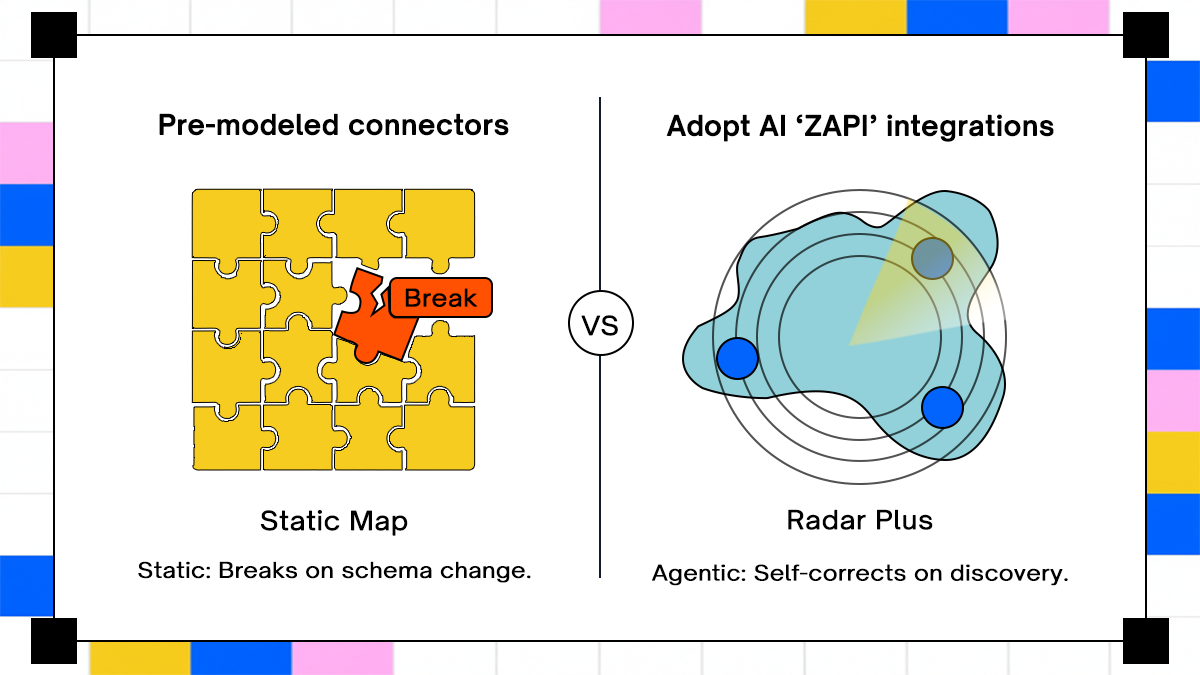
Static connector libraries expose a defined set of actions. Agents don't always know in advance which action they'll need. A connector that covers the standard Salesforce endpoints doesn't help an agent trying to read a custom object, update a non-standard field, or navigate an application state it hasn't seen before. Pre-modeled workflow steps break when the system's state changes unexpectedly, because the workflow was defined against a specific system configuration that may no longer be accurate.
Adopt's Zero-Shot API Ingestion eliminates the pre-modeling requirement. The platform automatically discovers and structures the application's API surface, including undocumented APIs and dynamically generated endpoints, and makes the resulting action set immediately callable by agents. Agents can navigate an application surface they haven't explicitly been programmed against, because the tool definitions are generated from discovery rather than from manual specification.
Per Adopt's open-source agent stack announcement, ZAPI auto-generates tool cards with no manual schemas or reverse engineering required, built so APIs become immediately interpretable by LLMs. The Agent Orchestrator then selects the right agent, action, or tool based on end-user intent, and the Integration Bridge (AdoptXchange) connects the whole stack to external frameworks like LangChain, LangGraph, CrewAI, and n8n.
Build vs. Buy vs. Embed: The Total Engineering Cost Calculation
The in-house build option looks cheaper than it is when viewed at the moment of first integration. One engineer, two weeks, one clean API integration. The cost becomes visible over two years: maintaining that integration through upstream API changes, debugging auth failures at 2am, and rebuilding the flow when the third-party vendor changes their webhook format without notice.
Embedded iPaaS shifts the maintenance cost from your team to the vendor, replacing the ongoing engineering burden with a license fee and whatever custom code is still required at the edges. Time-to-first-integration is measured in days rather than weeks. The economic argument for in-house build gets harder to make once the true maintenance cost is modeled over a two-year horizon.
Adopt's approach compresses the setup timeline further. Because APIs don't need to be manually defined before agents can act on them, teams avoid the initial modeling work that typically precedes integration development. Per Adopt's product documentation, agent-ready tools are available within 24 hours of setup, with zero manual endpoint definition required.
Conclusion
Traditional iPaaS and embedded iPaaS address different problems, sit in different parts of the stack, and serve different team personas. Traditional iPaaS handles internal operations automation. Embedded iPaaS delivers customer-facing integrations as a native product feature. The confusion between them is expensive precisely because the wrong tool works well enough in early testing, only to fail predictably when enterprise requirements arrive.
Teams that use traditional iPaaS for internal ops, embedded iPaaS (or an agentic platform with discovery-based integration) for customer-facing product features, and structure those choices by actual integration pattern rather than vendor marketing, end up with an architecture they can maintain, explain, and extend. The integration layer that holds up through year three is the one built on the right foundation from the start. Getting the category right before picking the vendor is the decision that matters most
FAQs
1. What's The Functional Difference Between Embedded iPaaS and Traditional iPaaS For A B2B SaaS Product Team?
Traditional iPaaS connects tools your internal team uses, through workflows your ops or IT team configures. Embedded iPaaS installs inside your SaaS product via SDK and lets your engineering team build customer-facing integrations that appear native to your product. The customer never needs a separate platform account.
2. Can A Traditional iPaaS Like Workato or Tray Be Used As An Embedded Integration Solution For Customer-Facing Workflows?
Technically yes, but with significant structural limitations. Wrapped embedded products from traditional iPaaS vendors inherit the cloud-only infrastructure, shared execution queues, and limited white-labeling of their core product. Auth flows often redirect to the vendor's domain, and self-hosted deployment isn't available for security-sensitive enterprise deployments.
3. How Does Embedded iPaaS Handle Multi-Tenant Auth and Per-Customer Configuration At Enterprise Scale?
A well-designed embedded iPaaS isolates each tenant's credentials, OAuth tokens, and execution logs at the platform level. The challenge surfaces with enterprise customers who have non-standard CRM schemas, custom objects, and unique field mappings, where platforms enforcing a fixed data model hit coverage gaps that require custom code to address.
4. When Should A SaaS Company Build Native Integrations Versus Publishing A Connector On A Traditional iPaaS Marketplace?
Build natively for any integration requested by a meaningful share of your customer base, particularly your top-tier and enterprise accounts. The iPaaS marketplace connector strategy is reasonable for long-tail requests that surface infrequently, from accounts where the engineering investment wouldn't be justified, with the understanding that those customers will own and maintain their own workflows.

.svg)
.svg)


Take three minutes to find out which side of that line you are on.
Browse Similar Articles


Find Your Agentic AI Readiness Score
Every enterprise thinks they are building toward Agentic AI. But only few actually are.
Take three minutes to find out which side of that line you are on.











