

Discover the top 5 AI workflow automation tools for 2026. Compare features, use cases, and performance for agent-based and AI-driven workflows.


TL;DR
- Standard automation fails because it assumes a fixed path where inputs produce static results every time. Agents shift their logic mid-run based on context, making traditional workflow maps useless in production. Persistent execution records every step so the system knows exactly where it stands after a crash or delay.
- Retrying a model call is risky because the model often provides a different answer on each separate attempt. This randomness triggers duplicate charges or double posts if the tool layer isn't strictly controlled. Verify the current system state before allowing an agent to execute any external action a second time.
- Knowing that a step failed is useless when the error stems from a model's internal logic or hallucinations. You need to see raw reasoning traces and the exact data the model reviewed before it chose its path. Debugging agentic systems requires a record of the logic behind every decision, not just a success log.
- Connecting a model directly to APIs creates a security hole where prompt injection becomes a weapon. Every action requested by the agent must pass through a separate policy layer that checks user permissions. Never trust the agent to stay within its bounds without a separate layer checking every requested operation.
- Visual tools like n8n work for simple sequences but fall apart when agents need to loop or re-evaluate. Code-first systems like Temporal provide the logic needed to handle unpredictable paths and long cycles. Match your infrastructure to the level of uncertainty and the cost of an incorrect execution at runtime.
- Treating AI like a deterministic API call leads to silent errors and inconsistent system outcomes. Build for variability by forcing the engine to track reasoning rather than just task completion. Consistency matters more than execution speed when workflows interact with high-stakes external systems.
Introduction
A workflow that behaves correctly in staging often fails shortly after deployment when exposed to real inputs, delayed responses, and unpredictable system interactions. According to Gartner’s research on hyperautomation, a large percentage of automation initiatives fail due to integration complexity and execution gaps rather than missing features. Similarly, Statista reports that enterprise automation adoption is increasing, yet reliability issues continue to surface in production environments where workflows span multiple systems.
The failure mode shifts with AI systems; Instead of hard crashes, workflows begin to produce inconsistent outputs, repeat actions, or trigger unintended operations because the automation layer cannot track how decisions evolve during execution. This is harder to detect, since the system appears operational while producing incorrect outcomes.
This article evaluates workflow automation tools based on how they behave when running AI agents in production. It focuses on execution models, failure handling, and interaction with external systems. It then compares five tools under conditions that expose real-world weaknesses not captured by feature comparisons.
What Changes When Workflows Become Agent-Driven
Agent-based workflows introduce a different execution model in which the system no longer follows a fixed path but instead makes decisions at runtime based on context, intermediate outputs, and tool responses. This shift changes how failures appear and how systems need to be designed.
Why Deterministic Workflow Engines Break with LLMs
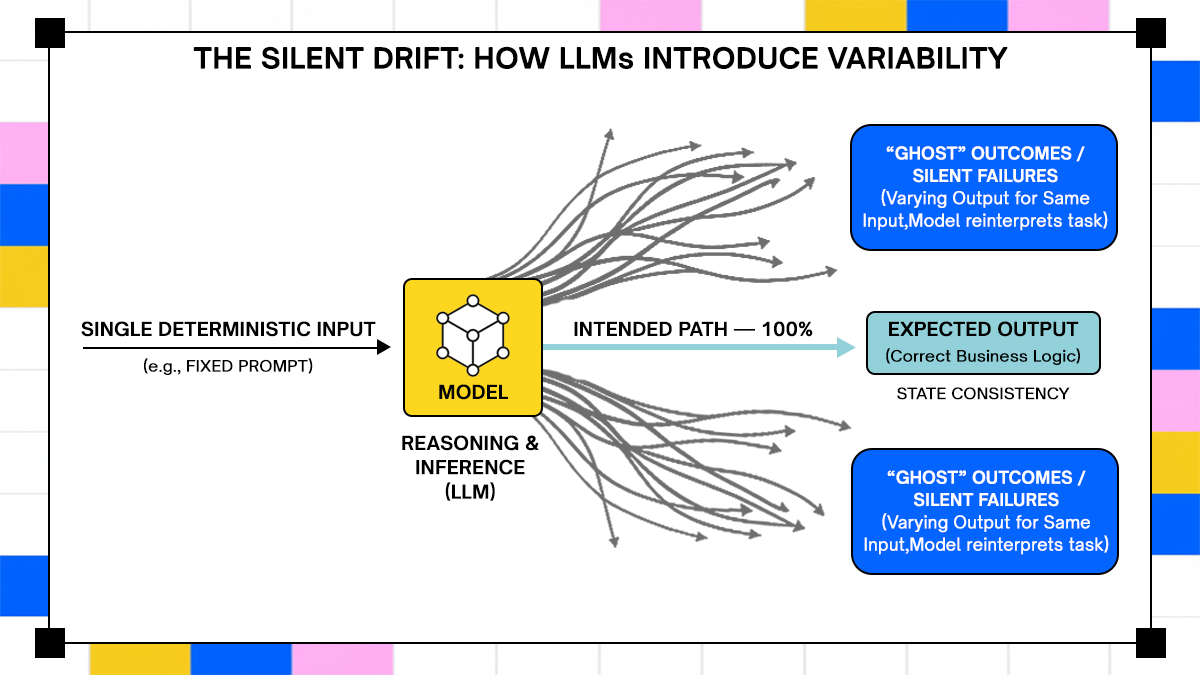
Traditional workflow engines are built around deterministic execution, where each step produces a predictable output given a known input. This works for systems such as ETL pipelines or API orchestration, where transformations are fixed and side effects are controlled.
Large language models do not follow this pattern. The same prompt can produce different outputs depending on conversation history, hidden system instructions, or even subtle phrasing changes. When this behavior is embedded into a workflow, the engine loses its ability to reliably predict what happens next.
This leads to issues that are not visible at the infrastructure level but show up as system inconsistencies. A workflow may repeat the same API call because the model reinterprets the task, or it may take a different execution branch without explicit logic defining that path. The workflow engine is functioning as designed, but the system behavior becomes unreliable because the underlying assumptions no longer hold.
Where Traditional Automation Still Works
Deterministic workflow systems still perform well when the problem space is bounded and the inputs are structured. Tasks such as scheduled data processing, webhook-triggered pipelines, or standard CRUD operations do not require runtime decision-making and therefore align well with existing automation tools.
In these scenarios, visual builders and rule-based engines provide clear advantages. They reduce implementation overhead and allow teams to define workflows without writing extensive code, while still maintaining predictable execution.
The limitations become apparent when workflows start to depend on interpretation rather than transformation. Once a system needs to decide what action to take based on unstructured input or dynamically select tools during execution, the assumptions underlying traditional automation break down, necessitating a different orchestration model.
What Actually Defines a Workflow Automation Tool for AI Systems
Once workflows start to depend on model decisions rather than fixed rules, the definition of a “workflow tool” changes. The system is no longer just executing steps; it is managing evolving state, interpreting outputs, and coordinating actions across multiple services.
Execution Model - Stateless vs Stateful
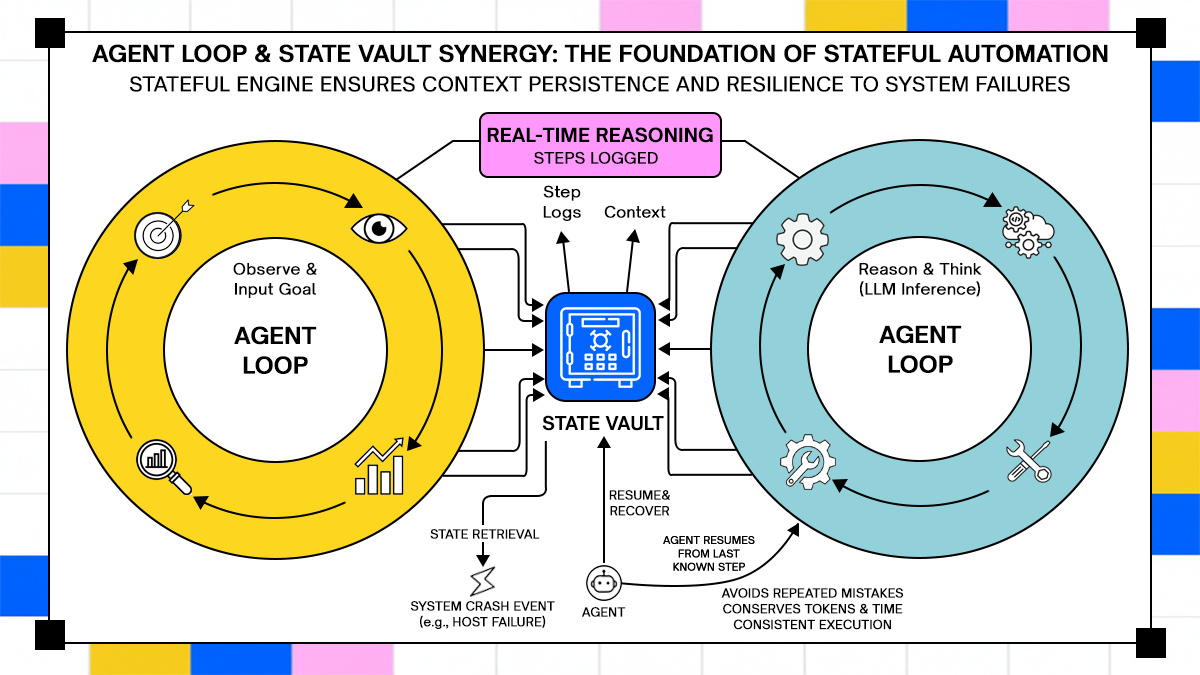
The first dividing line between workflow tools for AI systems is whether they treat execution as stateless or stateful. Stateless systems process each step independently, passing outputs forward without maintaining a durable understanding of what has already happened. This works for short-lived tasks, but it breaks down when workflows span multiple steps or depend on historical context.
Agent-based systems require states to persist across execution boundaries. An agent might call an API, wait for a response, reinterpret the result, and decide on the next action based on both the new data and prior reasoning. If the workflow engine does not explicitly maintain this state, the system starts to behave inconsistently, especially during retries or partial failures.
State is not just about storing variables. It includes tracking decisions, intermediate outputs, and execution history in a way that allows resumption safely. Without this, workflows either restart incorrectly or continue with incomplete context, both of which lead to incorrect system behavior.
Handling Tool Calls and External Systems
In agent-driven workflows, the most impactful actions happen when the system interacts with external tools such as APIs, databases, or internal services. The workflow engine must not only trigger these calls but also control when and how they are executed.
Traditional automation tools treat external calls as simple steps, assuming that each call either succeeds or fails in isolation. In agent systems, this assumption fails because the decision to call a tool is generated dynamically by the model, and the consequences of that call can affect future decisions.
This creates a need for guardrails around tool execution. The system must validate inputs, enforce constraints, and track which actions have already been performed. Without this layer, agents can trigger unintended operations such as duplicate transactions or unauthorized data access, even when the workflow definition itself appears correct.
Observability of Decisions And Not Just Steps
Most workflow tools provide visibility into execution steps, showing which tasks ran and whether they succeeded or failed. For agent-based systems, this level of observability is insufficient because the important behavior lies in how decisions are made, not just in which steps are executed.
Observability needs to include model inputs, outputs, and reasoning traces where available. Teams need to understand why a certain action was taken, not just that it happened. This becomes especially important when debugging failures that are not reproducible through static inputs.
Without decision-level visibility, debugging becomes guesswork. Engineers may see that an API call was triggered, but they cannot trace the reasoning behind that decision. This gap slows down incident response and makes it difficult to enforce consistent behavior across workflows.
Categories of Workflow Automation Tools in This List
Workflow tools start to diverge once you run agents in production. The split is not about UI vs. code; it is about how execution is modeled and how much control you have over state, retries, and external actions.
1. Visual Automation Tools
Visual builders such as n8n and Make are built around event-driven flows, where each node represents a step and data flows from one node to the next. This model works when execution paths are known in advance, but it becomes harder to control once decisions are generated dynamically by the model.
A simple agent workflow using a visual tool might look like this:
Use case: AI-powered support triage
Input: incoming support ticket
Step 1: send ticket text to LLM
Step 2: classify urgency and category
Step 3: route to Slack or create Jira ticket
This works fine until the agent needs to loop, re-evaluate, or call multiple tools conditionally. Visual tools struggle to represent loops with evolving context because each node expects a clear input-output contract.
A real issue appears when classification changes after a retry. If the workflow re-runs, the same ticket may get routed differently unless the system explicitly stores the first decision. Most visual tools do not enforce that by default.
2. Code-First Orchestrators
Code-first systems such as Temporal or Airflow treat workflows as programs. You define execution logic in code, which allows tighter control over state, retries, and branching behavior.
Use case: multi-step document processing agent
A typical flow:
- Upload document
- Extract text
- Run LLM summarization
- Validate output
- Store result
Here is a simplified Temporal-style workflow (Node.js):
// workflow.js
export async function documentWorkflow(fileId) {
const text = await extractText(fileId);
let summary = await summarize(text);
const isValid = await validate(summary);
if (!isValid) {
summary = await summarize(text, { retry: true });
}
await storeResult(fileId, summary);
}
What matters here is not the syntax, it is the execution model. Temporal persists every step, so if the process crashes after summarization, it resumes from that exact point instead of restarting the workflow. This becomes important when workflows include expensive model calls or external side effects.
3. Agent-Native Workflow Systems
Agent-native systems treat workflows as decision loops rather than fixed pipelines. Tools like LangGraph or Adopt AI fall into this category, where execution is built around state transitions and tool selection driven by the agent itself.
Use case: autonomous data enrichment agent
Input: new CRM lead
Agent decides: search company data, enrich contact details, validate via API, update CRM.
A simplified agent loop (conceptual but runnable pattern):
async function runAgent(agent, input) {
 let state = { input, history: [] };

 while (true) {
   const decision = await agent.next(state);

   if (decision.type === "finish") {
     return decision.output;
   }

   const result = await executeTool(decision.tool, decision.params);

   state.history.push({
     decision,
     result
   });
 }
}
In this model, the workflow is not a fixed graph. It evolves based on decisions made during execution. This is where traditional tools struggle the most. They expect predefined paths, while agent systems generate paths at runtime.
Top 5 Workflow Automation Tools for AI and Agent-Based Workflows
Each of the following tools is evaluated based on how it handles state, retries, long-running execution, and interaction with external systems. The focus is not on integrations or UI, but on how the system behaves when workflows become unpredictable.
1. Adopt AI
Adopt AI positions itself around executing workflows that involve multiple systems, long-running processes, and non-deterministic decisions. Their architecture focuses on handling workflows where retries, partial failures, and changing inputs are expected rather than edge cases.
From their public material, a key concept is modeling workflows as stateful processes rather than chained tasks. This aligns with real-world scenarios where workflows span hours or days and interact with multiple APIs that may fail or change behavior.
Real workflow: payment reconciliation with retries
Problem:
- Payment sync fails due to API timeout
- Retry causes duplicate charge
With a naive workflow:
- retry = repeat API call
- no awareness of prior execution
With a state-aware system:
- track payment state
- verify before retry
- prevent duplicate action
A simplified pattern:
async function reconcilePayment(paymentId) {
 const existing = await getPaymentStatus(paymentId);

 if (existing === "completed") {
   return "skip";
 }

 const result = await processPayment(paymentId);

 await updateStatus(paymentId, result);

 return result;
}
The difference is not in the code itself, but in whether the system guarantees that this logic is executed exactly once across retries and failures. Adopt AI’s positioning around integration drift and long-running workflows matches this pattern, where workflows are treated as evolving processes rather than static chains.
2. Temporal
Temporal is one of the most mature systems for durable workflow execution. It treats workflows as code and ensures that every step is persisted, allowing execution to resume safely after failures.
Real workflow: order fulfillment pipeline
- Create order
- Reserve inventory
- charge payment
- trigger shipment
Problem scenario:
- system crashes after payment
- restart causes duplicate charge
Temporal solves this by replaying workflow state instead of re-executing side effects.
export async function orderWorkflow(order) {
 await reserveInventory(order.id);

 if (!(await isCharged(order.id))) {
   await chargePayment(order.id);
 }

 await shipOrder(order.id);
}
The workflow checks state before executing side effects, and Temporal guarantees that execution resumes from the correct step. This makes it well-suited for systems where consistency matters more than speed.
3. LangGraph
LangGraph is built for agent workflows where execution is modeled as a graph of states and transitions. It is designed to support iterative reasoning and tool usage within a structured framework.
Real workflow: research agent
Input: query
Step 1: search web
Step 2: extract data
Step 3: evaluate relevance
loop until confidence threshold
from langgraph.graph import StateGraph

graph = StateGraph()

graph.add_node("search", search_tool)
graph.add_node("analyze", analyze_tool)

graph.set_entry_point("search")
graph.add_edge("search", "analyze")
graph.add_edge("analyze", "search")

app = graph.compile()
The workflow loops until a condition is met, which is difficult to represent in traditional automation tools without complex workarounds. LangGraph makes this explicit by modeling workflows as state transitions instead of linear pipelines.
4. n8n
n8n is a popular open-source workflow automation tool with a visual interface and the ability to run custom code. It sits between no-code tools and fully programmable orchestrators.
Real workflow: AI content moderation pipeline
Input: user-generated content
Step 1: send to LLM
Step 2: classify risk
Step 3: store result or flag
n8n allows adding custom logic inside nodes:
// n8n Function Nodeconst text = $json["content"];
const response = await fetch("https://api.openai.com/v1/chat/completions", {
method: "POST",
headers: { Authorization: `Bearer ${process.env.API_KEY}` },
body: JSON.stringify({
model: "gpt-4.1",
messages: [{ role: "user", content: text }]
})
});
const data = await response.json();
return [{ result: data.choices[0].message.content }];
The limitation appears when workflows need to loop or maintain long-term state. n8n can handle moderate complexity, but it requires manual work to enforce consistency across retries and failures.
5. Apache Airflow
Airflow is widely used for batch workflows and data pipelines. It is not built for agent systems, but it still appears in many AI stacks due to its scheduling and orchestration capabilities.
Real workflow: nightly AI data pipeline
- extract logs
- preprocess data
- run model inference
- store results
from airflow import DAG
from airflow.operators.python import PythonOperator
from datetime import datetime

def run_model():
   print("Running inference")

with DAG("ai_pipeline", start_date=datetime(2024, 1, 1)) as dag:
   task = PythonOperator(
       task_id="model_task",
       python_callable=run_model
   )
Airflow works well when workflows are scheduled and deterministic. It struggles with real-time agent systems because it does not manage evolving state or decision loops effectively.
Deep Comparison: Where These Tools Break in Real Systems
Feature lists hide the exact points where systems fail. These failures appear only when workflows run long enough, interact with multiple systems, and depend on decisions that change during execution.
The comparison here focuses on three failure modes that repeatedly show up in production systems: state loss, duplicate actions, and uncontrolled tool execution. Each one is illustrated with a workflow you can reproduce.
State Loss Across Multi-Step Execution
State loss occurs when a workflow cannot reliably reconstruct what has already happened after a retry, crash, or delayed continuation. This is common in systems that rely on passing data between steps without persisting execution history.
Reproducible workflow: multi-step lead enrichment
Step 1: receive lead
Step 2: fetch company data
Step 3: enrich contact details
Step 4: update CRM
Failure scenario:
- system crashes after step 3
- workflow restarts
- enrichment runs again with a different model output
In a stateless system, the workflow may repeat step 3 with slightly different results, leading to inconsistent data stored in the CRM. This is not a hard failure; it is a silent drift in the system state.
A minimal reproduction:
async function enrichLead(lead) {
 const company = await fetchCompany(lead.domain);
 const enrichment = await enrichWithLLM(company);

 await saveToCRM({
   ...lead,
   enrichment
 });
}
If this function is retried after partial completion, there is no guarantee that enrichWithLLM returns the same output, and no record of what was already stored.
How tools behave
- Adopt AI: models workflows as stateful processes, allowing decisions and results to be tracked across retries
- Temporal: persists execution history and resumes from the exact step, preventing re-execution unless explicitly allowed
- LangGraph: maintains state across transitions, but requires explicit design to persist and reload state
- n8n: relies on passing data between nodes, state persistence must be implemented manually
- Airflow: re-runs tasks based on DAG state, but does not track semantic changes in outputs
The difference is not whether state exists, but whether the system treats it as a first-class part of execution.
Duplicate Actions from Retry Failures
Retries are necessary in distributed systems, but in agent workflows they can trigger unintended side effects when the system does not enforce idempotency.
Reproducible workflow: payment processing agent
Step 1: The agent decides to charge customer
Step 2: call payment API
Step 3: update status
Failure scenario:
- API call succeeds
- status update fails
- workflow retries entire step
Without safeguards, the retry triggers another charge.
Example:
async function chargeCustomer(userId, amount) {
 const result = await paymentAPI.charge(userId, amount);

 await updateStatus(userId, "charged");

 return result;
}
This code assumes that retrying the function is safe. In reality, the payment API may not be idempotent unless explicitly handled.
Fix pattern: enforce idempotency
async function chargeCustomer(userId, amount) {
 const alreadyCharged = await checkCharge(userId);

 if (alreadyCharged) {
   return "skipped";
 }

 const result = await paymentAPI.charge(userId, amount);

 await updateStatus(userId, "charged");

 return result;
}
How tools behave
- Adopt AI: emphasizes state tracking and retry control across long-running workflows, reducing duplicate execution risk
- Temporal: supports idempotent workflows by replaying state and avoiding duplicate side effects
- LangGraph: requires explicit guardrails in agent logic
- n8n: retries nodes without built-in idempotency guarantees
- Airflow: retries tasks based on configuration, but does not prevent duplicate external actions
The key issue is that retries in agent systems are not just technical retries, they can change behavior because the model may produce different outputs on each attempt.
Tool Invocation Without Guardrails
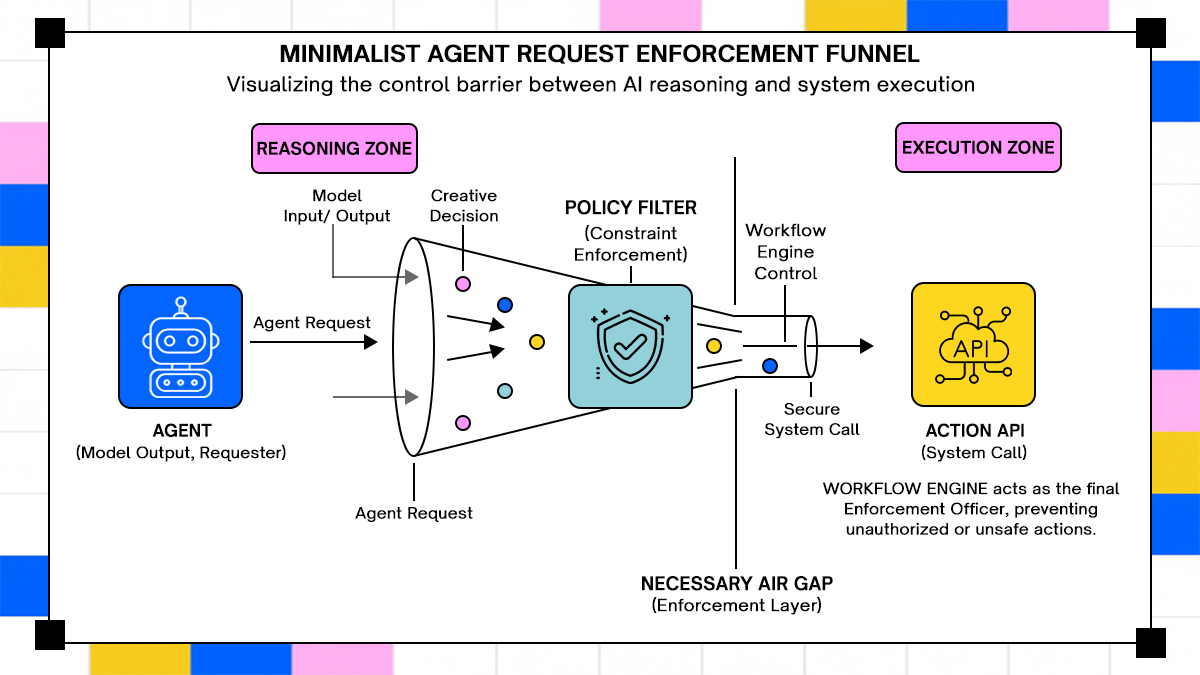
In agent workflows, the model decides when to call external tools. Without constraints, this creates a direct path from model output to system action.
Reproducible workflow: data export agent
- Input: “generate report”
- agent decides to call export API
- system executes export
Failure scenario:
- prompt injection modifies intent
- agent calls export with broader scope
- sensitive data is exposed
Example agent loop:
async function runAgent(input) {
 const decision = await model.decide(input);

 if (decision.tool === "export_data") {
   return await exportData(decision.params);
 }

 return "no action";
}
There is no validation of whether the action is allowed. The system trusts the model’s decision.
Fix pattern: introduce policy checks
async function safeExecute(decision, user) {
 const allowed = await checkPermissions(user, decision.tool);

 if (!allowed) {
   throw new Error("Unauthorized action");
 }

 return await executeTool(decision.tool, decision.params);
}
How tools behave
- Adopt AI: focuses on controlling how actions are triggered across systems, especially when workflows span multiple tools and APIs
- Temporal: does not manage model decisions, but provides control over execution boundaries
- LangGraph: allows structured tool invocation, but guardrails must be implemented explicitly
- n8n: executes predefined nodes, not suited for dynamic tool selection without custom logic
- Airflow: not designed for runtime decision-making
The risk is not just incorrect execution, it is uncontrolled execution driven by model output without verification.
When to Use Which Tool
Each tool fits a specific class of problems. The decision depends on how much variability exists in execution and how important correctness is for the system.
1. Simple Event-Based Automations
These workflows are triggered by events and follow a fixed sequence of steps. There is little to no runtime decision-making, and failures are easy to detect.
Example: Slack notification pipeline
- webhook receives event
- format message
- send to Slack
Tools like n8n or Make are sufficient here because the workflow is short-lived and deterministic. There is no need for durable execution or complex state management.
2. Multi-System Enterprise Workflows
These workflows span multiple services and often involve retries, partial failures, and long execution times. Consistency becomes more important than speed.
Example: order processing system
- validate order
- reserve inventory
- process payment
- update ERP
Temporal fits well in this category because it guarantees that each step is executed exactly once or retried safely. Airflow can also be used for batch-oriented variants of this workflow, but it lacks fine-grained control over execution state.
Adopt AI aligns with this category when workflows extend beyond deterministic steps and include evolving conditions or integration drift across systems.
3. Agent-Based Systems with Memory and Tooling
These workflows involve LLMs making decisions, calling tools, and updating state over multiple iterations. Execution paths are not predefined and may change during runtime.
Example: autonomous support agent
- receive ticket
- analyze intent
- fetch account data
- decide resolution
- execute action
LangGraph and Adopt AI are better suited here because they support decision-driven execution and state transitions. Temporal can still be used, but requires additional design to handle agent loops and reasoning steps. The choice depends on whether you want strict control over execution or flexibility in how decisions evolve during runtime.
Where Most Workflow Automation Architectures Fail
Failures in workflow automation rarely come from missing features. They come from incorrect assumptions about how systems behave under real conditions, especially when AI is involved.
1. Over-reliance on UI-Based Builders
Visual workflow builders create a sense of clarity because every step is visible. This works for simple pipelines, but it hides complexity when workflows involve loops, retries, and conditional execution based on model output.
A workflow that looks clean in a UI can still behave unpredictably because the underlying execution model does not enforce consistency. Engineers often end up adding custom code inside nodes, which defeats the purpose of the abstraction and introduces hidden complexity. The issue is not the UI itself, but the assumption that visual representation equals control over execution.
2. Lack of Execution Visibility
Many tools show which steps ran and whether they succeeded. This is not enough for agent systems, where the key question is why a decision was made. Without visibility into model inputs, outputs, and intermediate reasoning, debugging becomes slow and unreliable. Engineers may see that an API call was triggered, but they cannot trace the decision path that led to it. This gap becomes important when systems fail silently, producing incorrect results without triggering alerts.
3. Treating AI as Just Another API Call
A common mistake is integrating LLMs into existing workflows as if they behave like deterministic services. This assumption breaks quickly once the model starts producing different outputs under slightly different conditions. AI systems introduce variability into execution. If the workflow engine does not account for this, retries, branching, and tool invocation all become sources of inconsistency. The result is a system that appears functional but produces unreliable outcomes over time. That is harder to detect than a failure, and more expensive to fix.
Conclusion
Workflow automation tools were built for systems where execution paths are known ahead of time. That assumption breaks once AI agents start making decisions during runtime, calling tools, and updating state across multiple steps.
The comparison across Adopt AI, Temporal, LangGraph, n8n, and Airflow shows a clear pattern. Tools that treat workflows as stateful processes handle failures, retries, and long-running execution more reliably, while tools built around step-by-step chaining require additional safeguards to avoid inconsistent behavior.
This article examined how workflow automation changes once AI agents enter the system, where execution depends on context, prior state, and external interactions rather than fixed steps. It broke down what defines a workflow tool for these systems, including state handling, retry behavior, and visibility into decisions, then compared five tools across real failure scenarios such as state loss, duplicate actions, and uncontrolled tool execution. The goal was to move beyond feature lists and show how these tools behave under production conditions where workflows are long-running, non-deterministic, and tightly coupled with external systems.
Frequently Asked Questions
1. How are AI workflows different from traditional automation workflows?
AI workflows depend on model-generated decisions, which can vary with context and prior inputs. Traditional workflows follow fixed logic where the same input produces the same output, making them easier to predict and control.
2. Which workflow tools support agent-based execution?
Tools like LangGraph and Adopt AI are designed for agent-based workflows in which execution paths evolve at runtime. Temporal can support these systems with additional design effort, while tools like n8n and Airflow are better suited for deterministic workflows.
3. Can existing workflow tools handle LLM-based systems reliably
They can handle simple use cases such as classification or single-step inference. Reliability drops when workflows involve multiple steps, retries, or tool calls, because most tools do not manage evolving state or decision variability by default.
4. What is the biggest failure mode in AI workflow automation today?
The most common issue is a silent inconsistency, where workflows continue to run but produce incorrect or duplicated actions. This usually comes from missing state tracking, unsafe retries, or unvalidated tool execution driven by model output.

.svg)
.svg)


Take three minutes to find out which side of that line you are on.
Browse Similar Articles


Find Your Agentic AI Readiness Score
Every enterprise thinks they are building toward Agentic AI. But only few actually are.
Take three minutes to find out which side of that line you are on.











