

Explore the top 5 AI automation tools and where they fail in production. Learn key limitations, risks, and how to choose the right tool for reliabilit


TL;DR
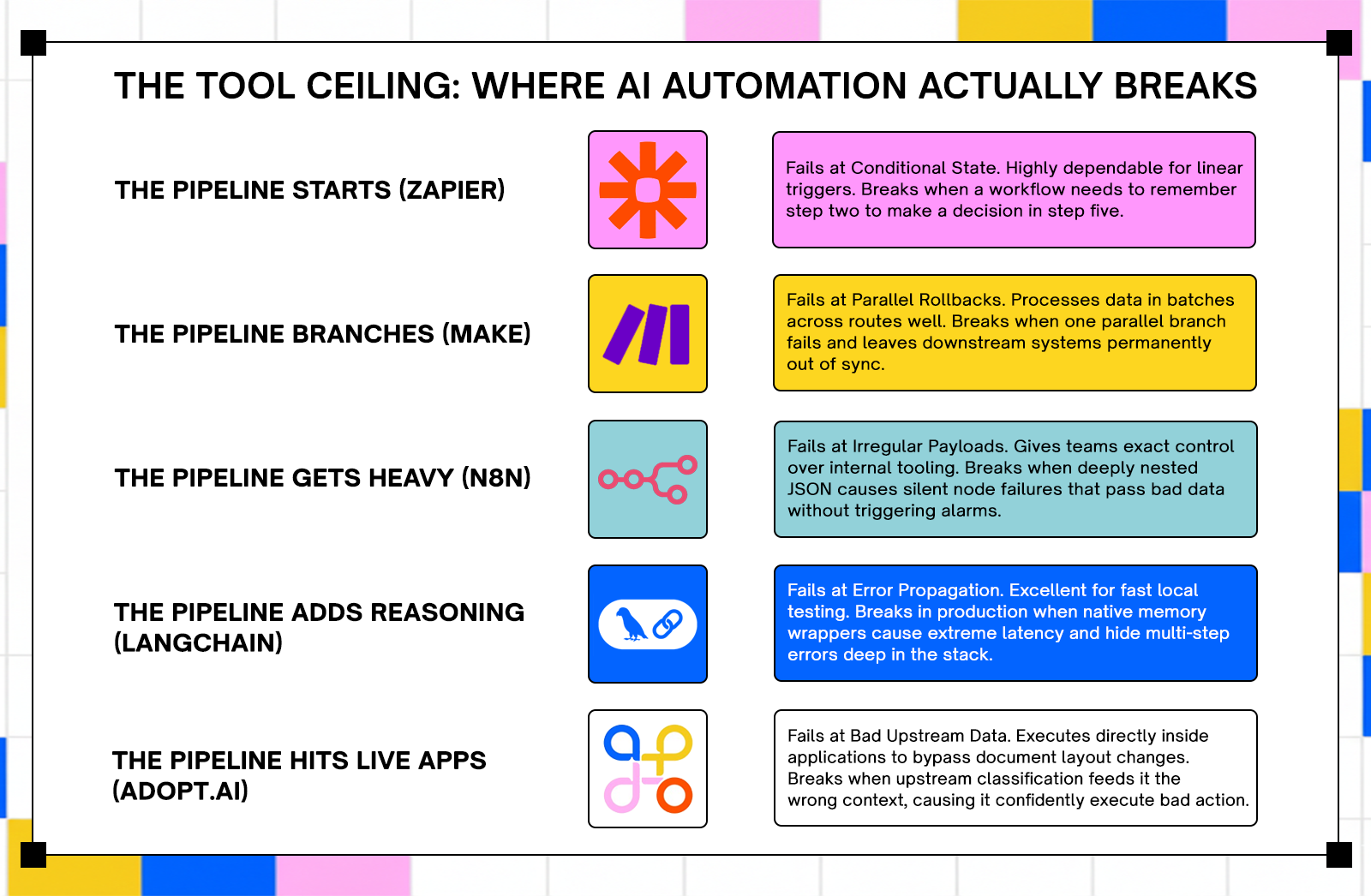
- Automation tools usually fail at the handoff point between data extraction and system execution. Adopt AI avoids this by operating directly inside applications via zero-shot API discovery, enabling agents to act on live systems instead of passing data between layers.It handles strict compliance requirements well but will execute against incorrect inputs if upstream classification is wrong
- LangChain builds fast prototypes but introduces technical overhead in production environments. Its abstractions can add latency, increase token usage, and make multi-step failures difficult to trace. It is useful for experimentation but requires significant engineering effort to stabilize for deployment.
- n8n provides strong control for teams managing predictable data pipelines and internal tooling. It struggles with deeply nested data structures and can pass incorrect outputs without raising errors. The self-hosted model removes per-task pricing limits but introduces operational overhead.
- Zapier handles simple connections between SaaS applications with high reliability. It breaks when workflows require maintaining state across steps or coordinating complex retry logic. Its pricing model works at low volume but becomes expensive at scale.
- Make processes data in parallel across structured scenarios and supports more complex workflows than Zapier. Its primary failure mode is partial execution, where failed parallel paths leave systems in inconsistent states. The pricing model counts each module execution, which increases cost as workflows scale.
Introduction
Pick any "best AI automation tools" list published in the last two years and the same pattern shows up: feature comparisons, pricing tables, and conclusions that avoid how these tools behave under real conditions.
Most evaluations ignore what happens when workflows encounter unexpected inputs, when data structures change, or when a mid-chain step fails without a clear signal. Those are normal operating conditions in production environments.
Adoption is accelerating faster than evaluation rigor. Gartner estimates 40% of enterprise applications will include task-specific AI agents by 2026, up from less than 5% in 2025. Global AI spending is projected to reach $2.52 trillion. More teams are deploying automation without understanding where systems fail.
Five tools actively used in production environments are examined here. Each section covers what the tool does, where it performs well, where it breaks, and how failure shows up in real workflows.
What "Breaking" Means in This Evaluation
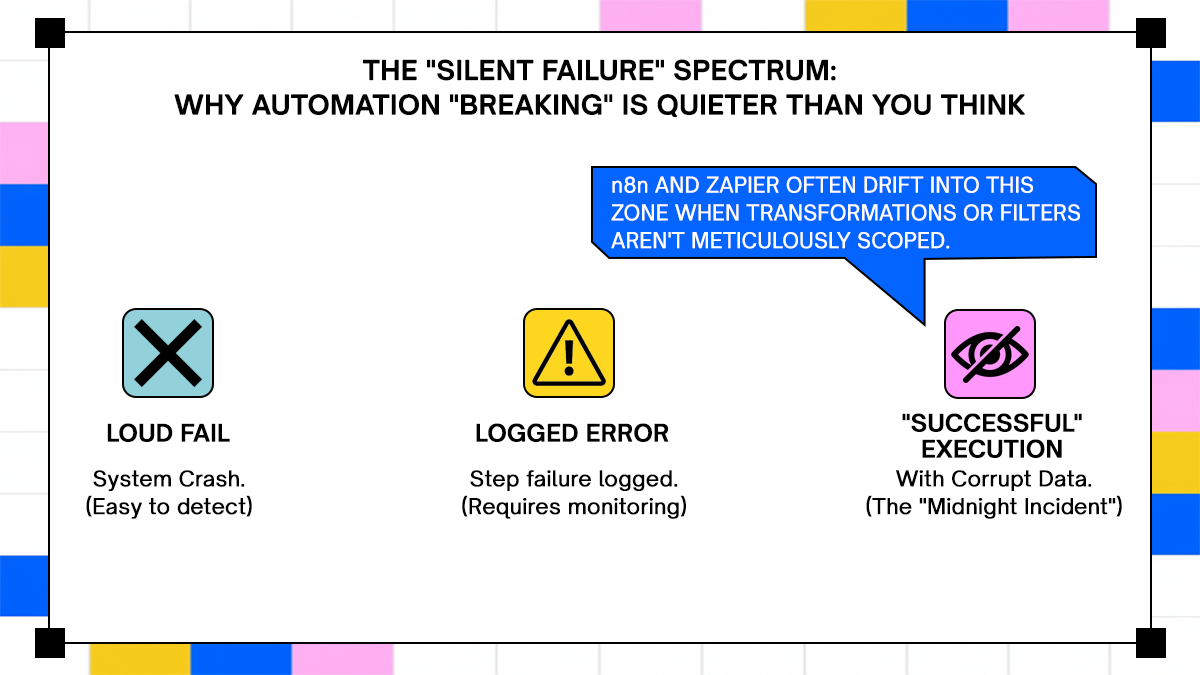
A tool doesn't have to crash to break. The more common failure mode is quieter: the tool keeps running, produces output, and the output is wrong. A document routes to the wrong downstream system. An execution step is silently dropped because a conditional branch wasn't handled. By the time anyone notices, the problem is two or three systems deep and the original cause is buried in logs that weren't designed to help.
For this evaluation, "breaking" means the point where a tool's design assumptions stop matching what production actually demands. Not edge cases. The foreseeable conditions that separate a demo from a deployment.
How These Five Tools Were Selected
Three criteria drove selection: documented production adoption at enterprise scale, coverage across the main categories of AI automation (document processing, agent orchestration, workflow automation), and the availability of failure patterns from engineering teams rather than vendor case studies. These aren't the newest tools. They're the ones most teams are actually running, which means there's enough production evidence to say something specific about where they break.
Top 5 Best AI Automation Tools
1. Adopt AI - Execution-first Enterprise Automation
Adopt AI occupies a different position from the other four tools here. LangChain, n8n, Zapier, and Make are built to move data between systems. Adopt is built to act inside them. The distinction isn't marketing language; it reflects a structural difference in how the platform handles application state, failure recovery, and change.
What Adopt AI Actually Does
The Architecture Behind It: Execution-First, Not Extraction-First
Most automation platforms are built around a handoff model: extract data from a source, transform it, pass it to a destination. The extraction and the execution live in separate layers, connected by a schema that both sides have to agree on. When either side changes, the schema breaks, and someone has to fix it manually.
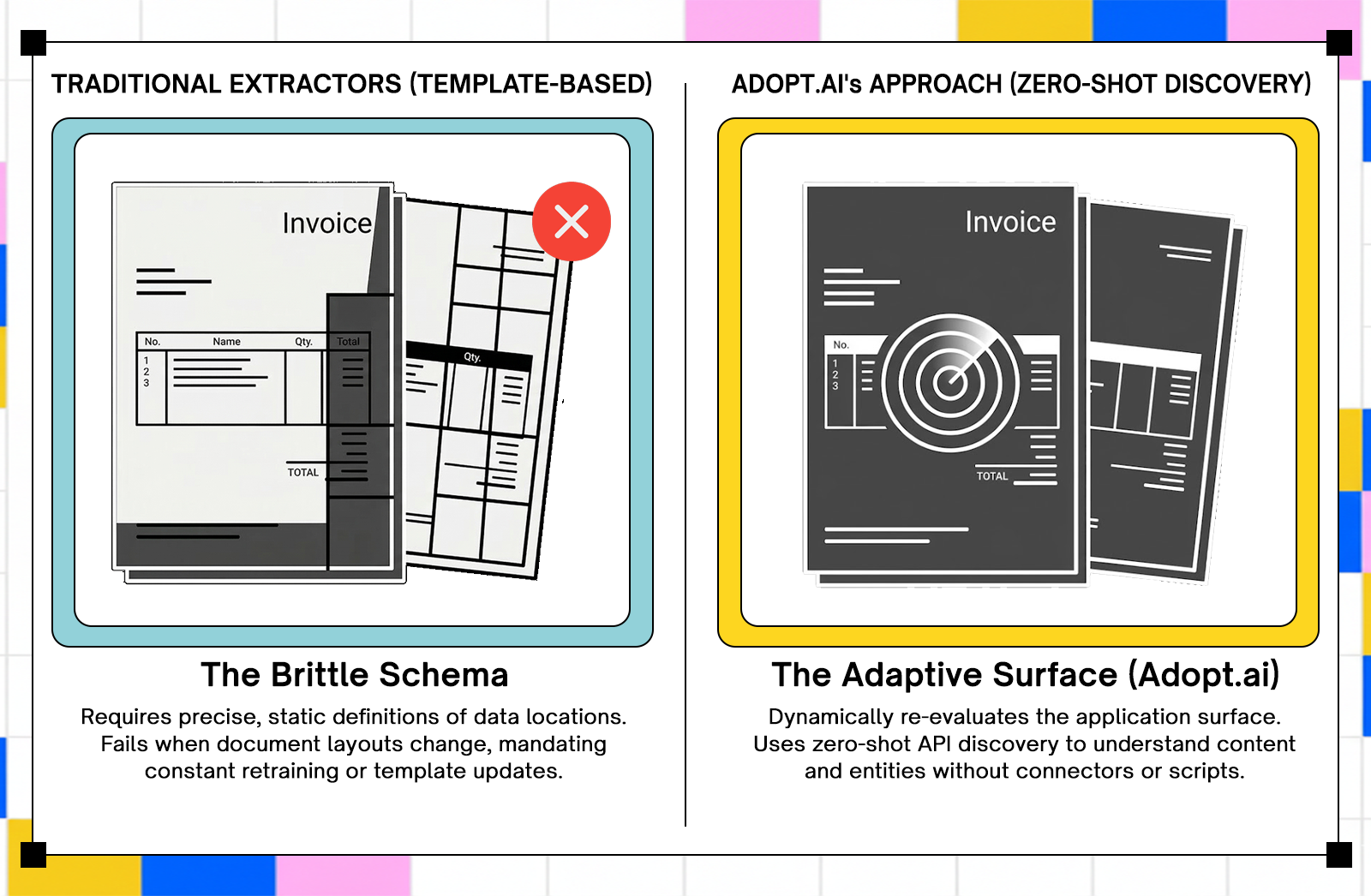
Adopt's architecture removes the handoff. Agents operate directly inside the applications that consume the data, rather than sitting upstream and passing fields through a connector. According to Adopt's official product documentation, the platform uses zero-shot discovery to automatically understand APIs and system data without requiring pre-built connectors or scripts, then turns that discovery into structured, executable actions that validate outcomes and adapt when underlying systems change.
How Agents Operate Against Live Application Surfaces
Adopt agentifies applications by automatically fetching APIs, content, entities, and URLs, then generating CRUD actions, navigation actions, assist actions, and analytical actions that operate via natural language prompts. When an application's interface or API changes, the agent re-evaluates the current surface rather than continuing to execute against a stale model.
The practical consequence is that the failure mode common to extraction-first tools, where a supplier's changed invoice layout silently corrupts a month of line-item data before anyone notices, doesn't occur in the same way. The agent detects the changed surface at the next execution cycle and flags the divergence rather than proceeding on a bad assumption.
Where Adopt AI Works in Production
Adopt's architecture is most appropriate for environments where document variability is high, downstream systems are numerous, and execution errors carry real compliance or financial consequences.
High-Variability Document Environments
When contracts arrive in different formats across jurisdictions, or a vendor changes an invoice layout mid-year, extraction-based tools require model retraining or template updates before processing can resume correctly. With zero-shot discovery, the agent re-evaluates the application surface on the next execution cycle rather than failing against outdated assumptions. For enterprises processing thousands of documents per day across dozens of suppliers, the operational difference between those two behaviors is significant.
Regulated Industries With Strict Audit Requirements
Adopt deploys in cloud, VPC, or fully on-prem environments to meet enterprise data residency requirements. Every agent action is logged with scope, intent, and outcome. Compliance teams can trace a document from ingestion to final system entry without reconstructing events from separate log sources. For teams in financial services or healthcare where an audit trail isn't optional, the logging architecture is often the deciding factor in whether a tool passes InfoSec review.
Teams That Have Reached the Ceiling of Extraction-Only Tools
Teams that get the most value from Adopt tend to have a specific history: they've already deployed an extraction-centric tool, managed the exception queues that followed, and discovered that extracted data without execution context creates as many problems as it solves. The execution-first model addresses that gap directly. Extracted data that can't answer "where did I come from" or "what happens if the next step fails" is a liability in any multi-system workflow.
Where Adopt AI Gets Stressed
Adopt has documented edge cases worth understanding before committing to a deployment. None of them are disqualifying, but each requires deliberate design decisions upfront.
When Upstream Document Classification Is Unreliable
Adopt's agents act on what the classification layer sends them. If a document is misclassified upstream, the agent executes against the wrong context with no internal mechanism to catch the mismatch before acting. The agent performs correctly given its input; the input is the problem. Teams that deploy Adopt into environments with weak classification pipelines should treat classification accuracy as a prerequisite, not a downstream concern. Build the classification layer first, verify its error rate under real document variability, then wire up execution agents.
Multi-System Chains With Undocumented API Behavior
Adopt executes workflows across SaaS platforms, on-prem systems, and enterprise data sources. In chains involving three or more downstream systems, failure recovery depends on each system's API behavior being stable and documented. When a third-party API changes its response schema without notice, Adopt's execution layer surfaces the divergence rather than logging it silently, which is better than a quiet failure. A human decision point is still required to resolve the ambiguity, and in high-volume environments, those decision points accumulate if the chain isn't monitored.
Scope Definition Under High Review Volume
When human review queues run fast, under-specified agent scope creates a bottleneck. Reviewers need to see what the agent attempted, why processing paused, and what specific decision they're being asked to make. Vague scope definitions at the agent configuration stage translate to vague review prompts at the human checkpoint, which slows throughput and introduces inconsistent decisions across reviewers.
What Adopt AI’s Logs Actually Tell You
Execution Trace Depth for Compliance Teams
Adopt's audit logging is part of the execution model, not a reporting layer added on top. Each action record carries scope, intent, and outcome, which means compliance teams don't need to correlate events across multiple log sources after the fact. The traceability is built into the action itself, not reconstructed from it. For regulated environments where audit completeness is a hard requirement, that architectural choice matters more than log volume.
How Divergence Surfaces vs How It Gets Buried
When an agent action produces an unexpected result, the platform surfaces the divergence at the next execution cycle rather than proceeding. Per Adopt's launch documentation, automated API change management keeps agent operations running by detecting changes in underlying APIs and flagging them before they propagate into downstream systems. For teams accustomed to discovering document processing errors through a failed payment or a customer complaint three weeks later, the detection window shrinking to the next execution cycle is a meaningful operational change.
Verdict: Who Should Use Adopt AI and Who Should Look Elsewhere
Adopt is well-suited to enterprises running high-variability workflows across multiple systems in regulated industries, where execution traceability is required and the cost of a silent processing error is high. It's not the right tool for teams who need a fast, low-code connector between two SaaS apps. The architecture is built for a different problem, and forcing it into a simpler use case adds complexity without adding value.
Ranked first because the execution-first model directly addresses the failure mode, silent downstream corruption from extraction errors, that affects every other tool on this list in some form.
2. LangChain - LLM agent orchestration framework
LangChain is probably the most widely recognized name in AI agent frameworks. It earned that recognition by genuinely making it easy to wire together LLMs, tools, memory, and APIs in a Python environment. The problem is that "easy to wire together" and "ready for production" are different things, and LangChain's architecture reflects its prototyping origins more than its enterprise aspirations.
What LangChain Actually Does
The Architecture Behind It: Chains, Agents, Tools, and Memory
LangChain is a framework for building LLM-powered applications by connecting models to tools, data sources, and memory systems through composable chains. The agent layer handles reasoning loops, tool selection, and multi-step task execution. LangGraph, LangChain's newer graph-based runtime, is now the recommended path for production agents requiring stateful execution.
Why It Became the Default Framework for LLM Orchestration
LangChain lowered the barrier to entry for LLM integration considerably. GitHub stars grew 220% between Q1 2024 and Q1 2025. For a developer who wants to build a working prototype in an afternoon, it still delivers on that promise.
Where LangChain Works in Production
LangChain has a real home in specific environments. Outside those environments, the costs add up quickly.
Rapid Prototyping and Research Pipelines
For proving a concept, evaluating a model's suitability for a task, or building an internal research tool where a broken chain is a learning opportunity rather than an incident, LangChain is genuinely useful. The abstraction layer that causes problems in production is exactly what makes iteration fast in a notebook.
Teams With Strong Python Engineers and a Tolerance for Maintenance Overhead
Teams with experienced Python engineers who understand the framework's internals can build reliable systems with LangChain. The keyword is "understand the internals." Teams who Adopt AI it because it looks simple in the docs and then hit production complexity without that depth tend to accumulate technical debt faster than they can repay it.
Where LangChain Breaks
This is the section that LangChain's documentation underweights. The failure modes are real, documented by engineers across many production deployments, and worth taking seriously.
Memory Management Failures Under Long Context Windows
LangChain's abstractions, especially its memory components and agent executors, can add over a second of latency per API call. One engineer cut API latency by more than a second just by removing LangChain's memory wrapper, without changing anything about the model or infrastructure. LangChain's default memory setups often store far more conversation history than necessary, leading to wasted tokens, higher API costs, and slower responses. After building a custom, trimmed-down memory solution, one team saw costs drop by nearly 30% in the first month.
Error Propagation in Multi-Step Agentic Tasks
When something breaks in a production LangChain app, finding the source is difficult. Is it the prompt? The chain? A callback? Something buried deep in the framework's internals? Without clear observability, you're essentially reverse-engineering your own stack every time there's an issue. In multi-step agentic tasks, an error in step two can propagate silently through steps three, four, and five before surfacing in a form that's completely disconnected from its origin.
The Abstraction Layer That Makes Debugging Feel Like Archaeology
LangChain's abstractions are helpful until they're not. The same layer that makes it fast to prototype makes it slow to debug in production. LangChain encourages building around its abstractions, which creates architectural lock-in. Its heavy dependency graph inflates container size, slows down deployments, and makes it painful to swap out components later.
What Happens When an Agent Decides to Improvise
In agentic tasks with broad scope, LangChain agents can make tool selection decisions that are technically valid but contextually wrong. The framework doesn't have a strong native mechanism for constraining agent behavior within production-safe boundaries without significant custom implementation. LangGraph improves this with explicit graph-based control flow, but that's a materially different implementation from classic LangChain chains.
What LangChain's Logs Actually Tell You
Verbose Output That Tells You Everything Except What Went Wrong
LangChain produces verbose output. The problem is that verbosity isn't the same as clarity. Logs trace every step of a chain's execution, but correlating a downstream failure with a specific upstream decision point requires either LangSmith (LangChain's paid observability tool) or significant custom instrumentation. Out of the box, you'll know that something failed. You'll spend more time than you'd like figuring out why.
The Notebook-to-Production Cliff
The gap between a working LangChain prototype and a reliable production system is wider than most teams expect going in. Teams often build a proof of concept that works well, then discover that simple production tasks require digging deep into the source code and understanding internal workings just to create basic custom classes. That's the cliff. Plan for it.
Verdict: When to Use LangChain and When to Walk Away
Use LangChain for prototyping, research, and internal tools where a failure is a debugging session rather than a production incident. Walk away from it as the core framework for any system where error traceability, latency predictability, and agent scope control are non-negotiable. LangGraph is the better path for production agents if you're already in the LangChain ecosystem.
Ranked second because the failure modes are well-documented and recoverable, but the path from prototype to production requires more engineering investment than the framework's adoption numbers imply.
3. n8n - Open-source visual workflow automation
n8n occupies a useful position in the automation market: more technical than Zapier, more accessible than building a custom orchestration layer, and self-hostable for teams with data sovereignty requirements. It also comes with a set of failure modes that don't show up until the workflows get complex and the data gets irregular.
What n8n Actually Does
The Architecture Behind It: Nodes, Workflows, and Execution Queues
n8n is an open-source workflow automation platform built around a visual node editor. Each node represents an action or a transformation. Workflows connect nodes into sequences, with branching, filtering, and scheduling built in. n8n uses a single-process workflow runtime unless you configure queue mode with workers. In queue mode, Redis is required as a message broker.
What Self-Hosting Actually Means in Practice
Successfully self-hosting n8n requires knowledge across several technical areas: Linux system administration, Docker proficiency, database management, security expertise, and network administration. That's not a warning against self-hosting. It's a scope statement. Teams who treat self-hosting as a cost-saving measure without accounting for the operational overhead tend to discover the real costs during an incident.
Where n8n Works in Production
When the use case matches n8n's architecture, it's a genuinely capable tool. The match conditions are specific.
Internal Tooling With Predictable, Well-Structured Data
n8n performs well when the data flowing through it is consistent, well-structured, and doesn't surprise the transformation nodes. Internal tooling workflows, HR automation, ticket routing, and scheduled data syncs between two systems with stable APIs are environments where n8n delivers reliably.
Mid-Complexity Integrations Without Per-Task Pricing Pressure
For teams running high-volume automation where Zapier's per-task pricing model creates budget problems, n8n's self-hosted model removes that ceiling. The trade-off is operational responsibility, but for teams with the DevOps capacity, that trade-off makes sense.
Teams That Need Full Workflow Ownership
n8n gives teams complete visibility into and control over their workflow logic, which matters in environments with strict compliance or data residency requirements. Adopt AI deploys inside your VPC via Helm so sensitive data stays in your environment and clears InfoSec faster, but n8n's open-source model offers a different kind of ownership: the ability to inspect and modify the platform itself.
Where n8n Breaks
The failure modes in n8n are specific and predictable. They show up reliably once workflows cross a certain complexity or data volume threshold.
Irregular Payloads and Deeply Nested JSON
n8n's performance can falter under heavy data processing. Workflows dealing with large datasets may encounter timeouts or memory constraints. The platform's single-threaded execution model can create bottlenecks when running multiple workflows simultaneously. Deeply nested JSON structures compound this: transformation nodes that work correctly on clean, flat payloads can produce unexpected output when the nesting depth increases or the schema changes.
Silent Node Failures Mid-Workflow
The more insidious failure mode in n8n isn't a crash; it's a transformation node that produces incorrect output without raising an error. The workflow completes successfully. The data entering the next node is wrong. Missing configuration variables are a common source of silent failures. If the N8N_ENCRYPTION_KEY is not set manually, you can lose access to every API credential if you migrate your server.
The Self-Hosting Tax: What You Own When You Run It Yourself
While the n8n self-hosted free version has no licensing fees, running it effectively introduces costs that many underestimate. Hosting, security, and maintenance can push monthly expenses to $200 to $500. That's before counting the engineering time for incident response, version upgrades, and database maintenance. When a server crashes, performance drops, or security vulnerabilities need patching, you need deep expertise in Linux, networking, and troubleshooting. If you don't have that background, you're left hiring an admin, which quickly wipes out any cost savings.
Visual Workflow Builders as a Debugging Liability at Scale
The visual builder is n8n's most accessible feature and, at scale, its most limiting one. Complex workflows with many branches and conditional paths become difficult to reason about visually. Debugging a failure in a 40-node workflow with nested sub-workflows is not a pleasant experience in any visual editor.
What n8n's Logs Actually Tell You
Execution History Depth vs Actual Diagnostic Value
n8n maintains an execution history log that records each workflow run and its outcome. The log is useful for confirming that a workflow ran and whether it completed. Its diagnostic value drops significantly when the failure is a wrong output rather than an error state, because the log records completion, not correctness.
What You're Missing When a Transformation Node Produces Wrong Output
When a Function node or a Set node produces unexpected output, the execution log shows the workflow as successful. Diagnosing the issue requires manually inspecting the input and output data at each node, which n8n supports through its execution view but doesn't surface automatically as an anomaly.
Verdict: The Right Call Until Your Data Gets Irregular
n8n is a good tool for teams with the DevOps capacity to self-host it, workflows that operate on predictable, well-structured data, and use cases that don't require complex parallel execution. The moment the data gets irregular, the payloads get large, or the workflow logic gets deeply nested, the visual abstraction starts working against you.
Ranked third because the failure modes are predictable and avoidable with the right use case fit, but the self-hosting tax and silent failure behavior require operational maturity that teams often underestimate at the start.
4. Zapier - Event-driven SaaS integration automation
Zapier has been connecting apps since 2011, and it still does that job better than almost anyone for the use case it's designed for. The problem is that its design ceiling is visible, and teams that build against it tend to discover the ceiling at the worst possible time.
What Zapier Actually Does
The Architecture Behind It: Triggers, Actions, and Linear Zap Chains
Zapier connects over 7,000 apps through a trigger-action model. An event in one app triggers a sequence of actions in one or more other apps. Each Zap is essentially a linear pipeline: trigger, then action, then action, in sequence. Multi-step Zaps add more actions to the chain but don't fundamentally change the linear execution model.
Why Breadth of Integration Is Both the Strength and the Problem
Zapier's integration breadth is its primary value proposition. If your automation needs connect well-known SaaS apps in a linear sequence, the answer is almost certainly already built. That same breadth means many integrations are thin wrappers around third-party APIs, and those APIs bring their own rate limits, authentication behaviors, and schema changes.
Where Zapier Works in Production
Zapier's strong suit is narrow and well-defined. Within that range, it's hard to beat for speed of implementation.
Simple High-Volume Linear Workflows
For workflows that follow a consistent "if this, then that" pattern, Zapier is fast to build, easy to monitor, and reliable enough for most use cases. Form submissions to CRM entries, email triggers to Slack notifications, ecommerce events to spreadsheet rows: these are Zapier's home territory.
Non-Technical Operators Who Need Automation Without Engineering Support
Zapier's interface is built for non-technical users. Marketing teams, operations coordinators, and sales teams can build and maintain Zaps without writing code or filing tickets. For organizations where automation literacy is low and workflow complexity is also low, that independence has real operational value.
Where Zapier Breaks
Zapier's failure modes are predictable. They arrive reliably once workflows cross the complexity threshold its architecture was built for.
Multi-Step Conditional Logic That Needs State
Zapier's Filter and Path steps allow for conditional branching, but they don't carry state across steps. A Zap that needs to know what happened in step two when making a decision in step five doesn't have a clean way to do that. Teams work around this with workarounds like storing intermediate values in a connected spreadsheet, which trades the original problem for a new one.
Third-Party API Rate Limits and How Zapier Handles Them
When a downstream API returns a rate limit error, Zapier retries the step. The retry behavior is configurable in some cases, but the retry logic is owned by Zapier, not by the engineer building the Zap. In high-volume workflows hitting APIs with strict rate limits, the interaction between Zapier's retry behavior and the API's throttling policy can produce inconsistent results that are difficult to debug.
What Happens When a Mid-Zap Step Fails Silently
Not every failed step in a Zap generates an alert. Steps that fail due to filtered conditions, or that complete but produce empty output, can allow subsequent steps to execute against null or malformed data. The task history will show the Zap ran. Finding the step where the output went wrong requires manually inspecting each step's input and output in the run history.
The Pricing Wall When Task Volume Scales
Zapier's task-based pricing model works well at low volume. At enterprise scale, the per-task cost adds up quickly. A workflow running tens of thousands of tasks per day across multiple Zaps can move from a negligible budget line to a significant one without a proportional increase in capability.
What Zapier's Logs Actually Tell You
Task History as a Debugging Tool: Surface-Level by Design
Zapier's task history shows each Zap run with a pass/fail status and the data at each step. The logs are readable and reasonably organized. What they don't provide is the ability to query across runs, set up anomaly detection, or correlate failures across multiple Zaps in a complex workflow. The debugging experience is adequate for simple workflows and limiting for complex ones.
What You Cannot Reconstruct After a Failure
Zapier's task history retention is limited by plan tier. On lower-tier plans, run history expires after a few days. In a scenario where a silent failure compounded over a week before anyone noticed, the historical execution data needed to trace the root cause may already be gone.
Verdict: The Right Tool Until You Need It to Think
Zapier earns its place for linear automation between well-supported SaaS apps. It's fast, accessible, and reliable within those constraints. The moment a workflow needs conditional state, complex retry logic, or meaningful error handling, the tool's architecture starts pushing back. Plan for that ceiling before you build against it.
Ranked fourth because the failure modes are structural rather than incidental, and the workarounds available within the tool add fragility rather than capability.
5. Make (Formerly Integromat) - Visual scenario-based workflow automation
Make occupies the space between Zapier's simplicity and a full custom orchestration layer. It's more capable than Zapier on almost every dimension that matters to a technical user, and it introduces a different set of sharp edges in exchange for that capability.
What Make Actually Does
The Architecture Behind It: Scenarios, Modules, Routes, and Data Bundles
Make's core abstraction is the scenario: a visual workflow composed of modules, where each module represents an API action or transformation. Data moves through scenarios as bundles, which are collections of items processed together. Routes allow for parallel execution paths within a scenario. The scheduler and error handlers are explicit configuration options, not afterthoughts.
How It Differs From Zapier Under the Hood
The most meaningful difference from Zapier is Make's data bundle model. Rather than processing one item at a time through a linear chain, Make processes batches of items across parallel routes. That's more powerful and more complex. The complexity is where most of Make's failure modes live.
Where Make Works in Production
Make's additional complexity over Zapier delivers value in specific scenarios. Knowing which ones they are saves time.
Moderately Complex Workflows With Scheduling and Filtering Requirements
Make handles workflows with multiple data sources, scheduling requirements, and filtering logic better than Zapier does. Scenarios that need to run on a precise schedule, process multiple data types in a single pass, and apply different logic to different data subsets are a reasonable fit.
Teams Comfortable With Explicit Data Mapping
Make requires more explicit data mapping than Zapier. Fields don't auto-map. Transformations require deliberate configuration. For technical users, that's a feature: the workflow does exactly what you told it to do. For non-technical users, it's a barrier that creates configuration errors.
Use Cases That Outgrow Zapier but Don't Justify Custom Orchestration
Make is a reasonable middle ground for teams who've hit Zapier's ceiling but don't have the engineering capacity to build and maintain a custom orchestration layer. It's not a permanent solution for complex enterprise automation, but it's a credible step up.
Where Make Breaks
Make's additional power comes with additional failure modes. These are the ones that cause the most operational pain.
Parallel Branch Failures and Incomplete Rollback Behavior
When parallel routes within a scenario fail, Make's error handling behavior depends on how the scenario's error handler is configured. By default, a failed route doesn't automatically roll back successful routes that ran in parallel. In scenarios where parallel routes update related records in downstream systems, partial execution can leave data in an inconsistent state.
Data Volume Limits on Non-Enterprise Plans
Make's operations-based pricing model limits the number of operations per month on lower-tier plans. At scale, the operation count adds up faster than expected because Make counts each module execution as an operation, not each scenario run. A single scenario run involving 10 modules across 500 data bundles consumes 5,000 operations.
Module Errors That Don't Surface Clearly
When a module returns an error from a third-party API, Make logs the error at the module level. The log entry contains the error code and message from the API. What it doesn't always contain is the full context needed to understand why the call was made with those specific parameters, which is the information actually needed to fix the problem.
What Make's Logs Actually Tell You
Execution Log Depth Compared to What You Actually Need at 2am
Make's execution logs are more detailed than Zapier's. Each scenario run logs the data bundles processed at each module, the duration, and any errors. For routine monitoring, that's sufficient. For debugging a failure in a complex scenario with multiple routes and error handlers, the log structure requires careful cross-referencing between the execution view and the scenario configuration.
The Debugging Experience When Something Breaks in a Nested Route
Make allows for nested routes and error handler routes. When a failure occurs inside a nested route, the execution log records the failure at the nested level. Tracing the failure back to the specific data bundle and module combination that triggered it takes more steps than the log structure makes obvious, particularly when the failure is intermittent.
Verdict: More Power Than Zapier, More Sharp Edges Than the Documentation Suggests
Make is the right call for teams who need more than linear automation and have the technical comfort to configure explicit data mapping and error handling. The complexity ceiling arrives faster than the documentation implies, and the error handling behavior in parallel scenarios requires careful design before deployment, not after a production incident.
Ranked fifth not because it's the weakest tool, but because its failure modes require the most anticipation to avoid, and the documentation does the least to prepare engineers for them.
Conclusion
The five tools covered here sit at different points on the complexity and control spectrum. Adopt AI handles execution across live application surfaces with full audit traceability, making it the most appropriate choice for high-variability enterprise document workflows in regulated environments. LangChain accelerates prototyping but carries production overhead that compounds with scale. n8n gives teams full workflow ownership at the cost of operational responsibility for everything that comes with self-hosting. Zapier covers linear automation between SaaS apps faster than any other tool, until the workflow needs to branch or remember something. Make extends that range into moderate complexity and introduces parallel execution behavior that requires careful error handling design before the first production deployment.
The tool that breaks last in your environment is the one whose failure modes fit your team's ability to detect and recover from them.
Frequently Asked Questions
1. What makes Adopt AI different from other AI automation tools?
Most automation tools are built around extracting data and passing it between systems through brittle handoffs. Adopt AI operates execution-first, meaning agents act directly inside the applications that consume the data rather than sitting outside them.
2. Which AI automation tool works best for regulated industries like finance or healthcare?
Adopt AI is built specifically for environments where audit trails, data residency, and access governance are non-negotiable. Every agent action is logged with scope, intent, and outcome, and the platform deploys inside your VPC or fully on-prem so sensitive data never leaves your environment.
3. Can Adopt AI handle documents that change format frequently?
Yes, and that's precisely where extraction-based tools fall apart. When a vendor changes an invoice layout or a government form updates its field positions, tools built on fixed templates require model retraining before they can process the new format correctly. Adopt's zero-shot discovery re-evaluates the application surface on each execution cycle, so format changes don't require manual intervention to keep the pipeline running.
4. When should a team choose Adopt AI over a tool like Zapier or Make?
When the workflow involves high-variability documents, downstream execution across multiple enterprise systems, and a compliance requirement for full traceability, Adopt AI is the appropriate choice. Zapier and Make are reasonable for linear SaaS-to-SaaS automation where the data is clean and the logic is simple.

.svg)
.svg)


Take three minutes to find out which side of that line you are on.
Browse Similar Articles


Find Your Agentic AI Readiness Score
Every enterprise thinks they are building toward Agentic AI. But only few actually are.
Take three minutes to find out which side of that line you are on.











